Other Articles
- IAM - Enable User MFA
- IAM - Enforce Key Rotation
- IAM - Enforce Active Key Limit
- IAM - Disable Unused User Credentials
- IAM - Enforce Group Permission
- IAM - Enforce Password Length
- IAM - Prohibit Password Reuse
- IAM - Check Root Access Keys Existence
- IAM - Enable Root MFA
- IAM - Establish Support Role
- IAM - Enable Key Rotation
- Purge Expired Certificates
- EC2 Volume – Enable EBS Volume Backup
- EC2 Volume – Enable EBS Encryption
- EFS – Enable EFS Storage Backup
- S3 Bucket – Enable S3 Bucket Versioning
- S3 Bucket – Enable S3 Bucket Encryption
- S3 Bucket – Block S3 Bucket Public Access
- RDS DB Instance – Encryption of Storage
- RDS DB Instance – Enable Deletion Protection
- RDS DB Instance – Enable Auto Minor Version Upgrade
- DynamoDB Table – Enable Table Encryption
- DynamoDB Table – Enable Table Point In Time Recovery
- DynamoDB Table – Enable Table Deletion Protection
- EKS Cluster – Enable Secrets Encryption
- OpenSearch Domain – Enable Encryption at Rest
- RDS DB Cluster – Retain Backups for 7 Days
- RDS DB Cluster – Encryption of Storage
- EC2 Instance – Monitor CPU Utilization
- ECS Service – Monitor CPU Utilization
- ECS Service – Monitor Memory Utilization
- RDS DB Instance – Monitor Free Storage Space
- RDS DB Instance – Monitor CPU Utilization
- SQS Queue – Monitor Message Age
- SQS Queue – Monitor Message Visibility
- DynamoDB Table – Monitor Table Read Capacity
- DynamoDB Table – Monitor Table Write Capacity
- DynamoDB Table – Monitor Table Latency
- Enable CloudTrail
- Encrypt CloudTrail Logs
- EC2 VPC – Ensure Flow Logs are Enabled
- EKS Cluster – Enable Control Plane Logging
- CloudWatch Log Group – Enable KMS Encryption
- CloudWatch Log Group – Configure Retention
- Load Balancer – Enable Access Logs
- RDS DB Instance – Block Public Access
- EC2 Security Group – Restrict Public SSH and RDP Access
- EC2 Security Group – Restrict Public Database Access
- EKS Cluster – Restrict Public Endpoint
- EC2 VPC – Restrict Default Security Group Traffic
- Load Balancer – Redirect HTTP Traffic to HTTPS
- Load Balancer – Use Strong TLS Policies
- OpenSearch Domain – Enable Node-to-Node Encryption
- OpenSearch Domain – Enforce HTTPS
- OpenSearch Domain – Restrict Public Access
- RDS DB Cluster – Block Public Access
- EC2 Instance – Enable Deletion Protection
- ECS Service – Enable Auto Scaling
- Load Balancer – Enable Deletion Protection
- Enable AWS Security Hub
- Enable GuardDuty
- CloudFront Distribution – Enforce HTTPS for Viewers
- CloudFront Distribution – Require TLS 1.2 for Viewers
- CloudFront Distribution – Associate a WAF Web ACL
- CloudFront Distribution – Protect S3 Origin Access
- KMS Key – Avoid Pending Deletion
- SNS Topic – Enable Encryption
- SNS Topic – Restrict Topic Policy Access
RDS DB Cluster – Enable Deletion Protection
Secure Configuration Checks > AWS
This check ensures that deletion protection is enabled on Amazon RDS DB clusters, such as Amazon Aurora clusters. With deletion protection on, a cluster cannot be deleted by mistake or by an attacker until the setting is turned off first. Deleting a cluster removes its data and, unless you keep a snapshot, cannot be undone.
Check Details
- Resource: RDS DB Cluster
- Check: Enable RDS cluster deletion protection (
DeletionProtectionEnabled) - Risk: An accidental or malicious delete request removes the cluster and its data, and causes an outage
Remediation via AWS Console
-
Log in to the AWS Management Console and open the Amazon RDS console.

-
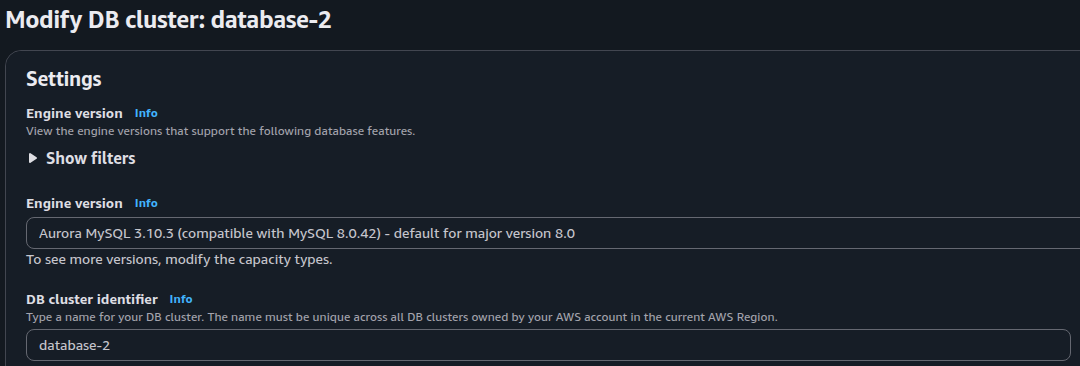
In the left navigation pane, click Databases. Select the DB cluster (the row with the role Regional cluster or Multi-AZ DB cluster) and click Modify.
-
Expand Additional configuration. Select Enable deletion protection.

- Click Continue. Under Scheduling of modifications, choose Apply immediately.
- Click Modify cluster.
- Repeat steps 2 to 5 for every DB cluster without deletion protection.
Remediation via AWS CLI
-
Log in to the AWS Management Console and click the CloudShell icon (
>_) in the top-right corner.
-
List the DB clusters that have deletion protection turned off. The output shows the cluster name and the engine:
aws rds describe-db-clusters \
--query 'DBClusters[?DeletionProtection==`false`].[DBClusterIdentifier,Engine]' \
--output text
The command covers one region. Add
--region <region>to check another. -
Turn on deletion protection:
aws rds modify-db-cluster \
--db-cluster-identifier <cluster-name> \
--deletion-protection \
--apply-immediately
-
Verify the setting:
aws rds describe-db-clusters \
--db-cluster-identifier <cluster-name> \
--query 'DBClusters[0].[DBClusterIdentifier,DeletionProtection]' \
--output text
The value must be
True.
Replace <cluster-name> with the identifier of the DB cluster, for example prod-aurora-cluster.
Repeat steps 3 and 4 for each cluster that step 2 lists.
To turn the protection off before a planned deletion, run the same modify-db-cluster command with --no-deletion-protection instead of --deletion-protection.
Updated on 05 November, 2026