Other Articles
- IAM - Enable User MFA
- IAM - Enforce Key Rotation
- IAM - Enforce Active Key Limit
- IAM - Disable Unused User Credentials
- IAM - Enforce Group Permission
- IAM - Enforce Password Length
- IAM - Prohibit Password Reuse
- IAM - Check Root Access Keys Existence
- IAM - Enable Root MFA
- IAM - Establish Support Role
- IAM - Enable Key Rotation
- Purge Expired Certificates
- EC2 Volume – Enable EBS Volume Backup
- EC2 Volume – Enable EBS Encryption
- EFS – Enable EFS Storage Backup
- S3 Bucket – Enable S3 Bucket Versioning
- S3 Bucket – Enable S3 Bucket Encryption
- S3 Bucket – Block S3 Bucket Public Access
- RDS DB Instance – Encryption of Storage
- RDS DB Instance – Enable Deletion Protection
- RDS DB Instance – Enable Auto Minor Version Upgrade
- DynamoDB Table – Enable Table Encryption
- DynamoDB Table – Enable Table Point In Time Recovery
- DynamoDB Table – Enable Table Deletion Protection
- EKS Cluster – Enable Secrets Encryption
- OpenSearch Domain – Enable Encryption at Rest
- RDS DB Cluster – Retain Backups for 7 Days
- RDS DB Cluster – Encryption of Storage
- RDS DB Cluster – Enable Deletion Protection
- EC2 Instance – Monitor CPU Utilization
- ECS Service – Monitor CPU Utilization
- ECS Service – Monitor Memory Utilization
- RDS DB Instance – Monitor Free Storage Space
- RDS DB Instance – Monitor CPU Utilization
- SQS Queue – Monitor Message Age
- SQS Queue – Monitor Message Visibility
- DynamoDB Table – Monitor Table Read Capacity
- DynamoDB Table – Monitor Table Write Capacity
- DynamoDB Table – Monitor Table Latency
- Enable CloudTrail
- Encrypt CloudTrail Logs
- EC2 VPC – Ensure Flow Logs are Enabled
- EKS Cluster – Enable Control Plane Logging
- CloudWatch Log Group – Enable KMS Encryption
- Load Balancer – Enable Access Logs
- RDS DB Instance – Block Public Access
- EC2 Security Group – Restrict Public SSH and RDP Access
- EC2 Security Group – Restrict Public Database Access
- EKS Cluster – Restrict Public Endpoint
- EC2 VPC – Restrict Default Security Group Traffic
- Load Balancer – Redirect HTTP Traffic to HTTPS
- Load Balancer – Use Strong TLS Policies
- OpenSearch Domain – Enable Node-to-Node Encryption
- OpenSearch Domain – Enforce HTTPS
- OpenSearch Domain – Restrict Public Access
- RDS DB Cluster – Block Public Access
- EC2 Instance – Enable Deletion Protection
- ECS Service – Enable Auto Scaling
- Load Balancer – Enable Deletion Protection
- Enable AWS Security Hub
- Enable GuardDuty
- CloudFront Distribution – Enforce HTTPS for Viewers
- CloudFront Distribution – Require TLS 1.2 for Viewers
- CloudFront Distribution – Associate a WAF Web ACL
- CloudFront Distribution – Protect S3 Origin Access
- KMS Key – Avoid Pending Deletion
- SNS Topic – Enable Encryption
- SNS Topic – Restrict Topic Policy Access
CloudWatch Log Group – Configure Retention
Secure Configuration Checks > AWS
This check ensures that every Amazon CloudWatch log group has a retention period. By default, logs never expire, which grows storage cost and keeps data longer than needed.
Check Details
- Resource: CloudWatch Log Group
- Check: Configure log group retention (
RetentionConfigured) - Risk: Logs pile up with no limit, raising cost and exposure
Remediation via AWS Console
-
Log in to the AWS Management Console and open the Amazon CloudWatch console.

-
In the left navigation pane, click Logs > Log Management. Find the log groups where the Retention column shows Never expire.

- Select one or more of these log groups.
-
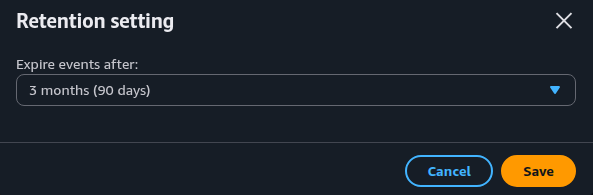
Click Actions > Edit retention setting(s). Choose a retention period and click Save.
Remediation via AWS CLI
-
Log in to the AWS Management Console and click the CloudShell icon (
>_) in the top-right corner.
-
List the log groups that never expire:
aws logs describe-log-groups \
--query 'logGroups[?!retentionInDays].logGroupName' \
--output table
The command covers one region. Add
--region <region>to check another. -
Set a retention period on one log group:
aws logs put-retention-policy \
--log-group-name <log-group-name> \
--retention-in-days <days>
-
Or set the same period on every log group that never expires:
DAYS=365

for LG in $(aws logs describe-log-groups \
  --query 'logGroups[?!retentionInDays].logGroupName' \
  --output text); do
  aws logs put-retention-policy \
    --log-group-name "$LG" \
 --retention-in-days "$DAYS"
done
Use this only when one period suits all of these log groups.
-
Verify the retention period:
aws logs describe-log-groups \
--log-group-name-prefix <log-group-name> \
--query 'logGroups[*].[logGroupName,retentionInDays]' \
--output table
Replace <log-group-name> with the log group name, for example /aws/lambda/my-function.
Replace <days> with a valid period, for example 365.
Updated on 04 November, 2026