Other Articles
- IAM - Enable User MFA
- IAM - Enforce Key Rotation
- IAM - Enforce Active Key Limit
- IAM - Disable Unused User Credentials
- IAM - Enforce Group Permission
- IAM - Enforce Password Length
- IAM - Prohibit Password Reuse
- IAM - Check Root Access Keys Existence
- IAM - Enable Root MFA
- IAM - Establish Support Role
- IAM - Enable Key Rotation
- Purge Expired Certificates
- EC2 Volume – Enable EBS Volume Backup
- EC2 Volume – Enable EBS Encryption
- EFS – Enable EFS Storage Backup
- S3 Bucket – Enable S3 Bucket Versioning
- S3 Bucket – Enable S3 Bucket Encryption
- S3 Bucket – Block S3 Bucket Public Access
- RDS DB Instance – Encryption of Storage
- RDS DB Instance – Enable Deletion Protection
- RDS DB Instance – Enable Auto Minor Version Upgrade
- DynamoDB Table – Enable Table Encryption
- DynamoDB Table – Enable Table Point In Time Recovery
- DynamoDB Table – Enable Table Deletion Protection
- EKS Cluster – Enable Secrets Encryption
- OpenSearch Domain – Enable Encryption at Rest
- RDS DB Cluster – Retain Backups for 7 Days
- RDS DB Cluster – Encryption of Storage
- RDS DB Cluster – Enable Deletion Protection
- EC2 Instance – Monitor CPU Utilization
- ECS Service – Monitor CPU Utilization
- ECS Service – Monitor Memory Utilization
- RDS DB Instance – Monitor Free Storage Space
- RDS DB Instance – Monitor CPU Utilization
- SQS Queue – Monitor Message Age
- SQS Queue – Monitor Message Visibility
- DynamoDB Table – Monitor Table Read Capacity
- DynamoDB Table – Monitor Table Write Capacity
- DynamoDB Table – Monitor Table Latency
- Enable CloudTrail
- Encrypt CloudTrail Logs
- EC2 VPC – Ensure Flow Logs are Enabled
- EKS Cluster – Enable Control Plane Logging
- CloudWatch Log Group – Enable KMS Encryption
- CloudWatch Log Group – Configure Retention
- Load Balancer – Enable Access Logs
- RDS DB Instance – Block Public Access
- EC2 Security Group – Restrict Public SSH and RDP Access
- EC2 Security Group – Restrict Public Database Access
- EKS Cluster – Restrict Public Endpoint
- EC2 VPC – Restrict Default Security Group Traffic
- Load Balancer – Redirect HTTP Traffic to HTTPS
- Load Balancer – Use Strong TLS Policies
- OpenSearch Domain – Enable Node-to-Node Encryption
- OpenSearch Domain – Enforce HTTPS
- RDS DB Cluster – Block Public Access
- EC2 Instance – Enable Deletion Protection
- ECS Service – Enable Auto Scaling
- Load Balancer – Enable Deletion Protection
- Enable AWS Security Hub
- Enable GuardDuty
- CloudFront Distribution – Enforce HTTPS for Viewers
- CloudFront Distribution – Require TLS 1.2 for Viewers
- CloudFront Distribution – Associate a WAF Web ACL
- CloudFront Distribution – Protect S3 Origin Access
- KMS Key – Avoid Pending Deletion
- SNS Topic – Enable Encryption
- SNS Topic – Restrict Topic Policy Access
OpenSearch Domain – Restrict Public Access
Secure Configuration Checks > AWS
This check ensures that Amazon OpenSearch Service domains are not open to the public. A domain is compliant if it runs inside a VPC, or if its access policy does not allow unrestricted access to every principal. An open domain lets anyone on the internet search, change or delete your data.
Check Details
- Resource: OpenSearch Service Domain
- Check: Restrict public access to OpenSearch domains (
NotPubliclyAccessible) - Risk: Attackers can read, change or delete the data, or use the domain for their own purposes
Remediation via AWS Console
-
Log in to the AWS Management Console and open the Amazon OpenSearch Service console.

- In the left navigation pane, click Domains and select the affected domain.
-
Open the Security configuration tab and click Edit.

-
Under Access policy, choose Configure domain level access policy. Replace any statement that uses
"Principal": "*"with one that names the IAM roles or users that need access.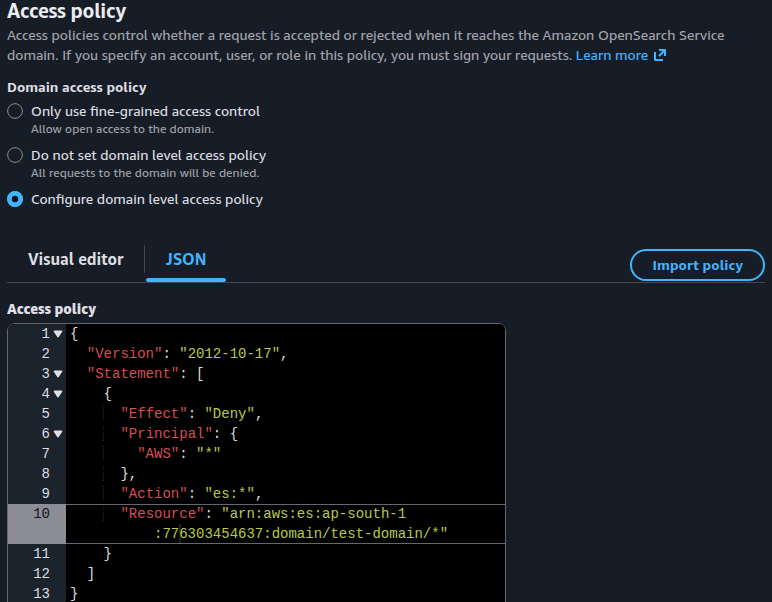
- Click Save changes. Wait until the domain status is Active and the change is complete.
- Repeat steps 2 to 5 for every domain with an open access policy.
Remediation via AWS CLI
-
Log in to the AWS Management Console and click the CloudShell icon (
>_) in the top-right corner.
-
List the public domains whose access policy allows a wildcard principal without a condition:
for d in $(aws opensearch list-domain-names \
  --query 'DomainNames[].DomainName' --output text); do
  aws opensearch describe-domain --domain-name "$d" --output json | \
  jq -r '.DomainStatus
    | select((.VPCOptions.VPCId // "") == "")
    | select(
        [(.AccessPolicies // "{\"Statement\":[]}") | fromjson
         | [.Statement] | flatten | .[]
         | select(.Effect == "Allow"
             and (has("Condition") | not)
             and ((.Principal | tostring) | test("\"\\*\"|^\\*$")))]
        | length > 0)
    | .DomainName'
done
The command covers one region. Add
--region <region>to eachawscommand to check another. Domains in a VPC are skipped. -
Save the current access policy so that you can compare or roll back:
aws opensearch describe-domain \
--domain-name <domain-name> \
--query 'DomainStatus.AccessPolicies' \
--output text > old-policy.json
-
Create a policy that names the principals that need access, and apply it:
cat > policy.json <<'EOF'
{
  "Version": "2012-10-17",
  "Statement": [
    {
      "Effect": "Allow",
      "Principal": {"AWS": "arn:aws:iam::<account-id>:role/<role-name>"},
      "Action": "es:ESHttp*",
      "Resource": "arn:aws:es:<region>:<account-id>:domain/<domain-name>/*"
    }
  ]
}
EOF

aws opensearch update-domain-config \
--domain-name <domain-name> \
--access-policies file://policy.json
Add one
Allowstatement or principal for each role or user that needs access. -
Check the progress. Wait until
ProcessingisFalse:aws opensearch describe-domain \ --domain-name <domain-name> \ --query 'DomainStatus.Processing'
-
Verify the access policy:
aws opensearch describe-domain \
--domain-name <domain-name> \
--query 'DomainStatus.AccessPolicies' \
--output text
The policy must name specific principals. It must not contain
"Principal": "*"without a condition.
Replace <domain-name> with the name of the domain, for example my-search-domain.
Replace <account-id> with your 12-digit AWS account ID, <region> with the region of the domain, and <role-name> with the IAM role that needs access.
Repeat steps 3 to 6 for each domain that step 2 lists.
Updated on 04 November, 2026