Other Articles
- IAM - Enable User MFA
- IAM - Enforce Key Rotation
- IAM - Enforce Active Key Limit
- IAM - Disable Unused User Credentials
- IAM - Enforce Group Permission
- IAM - Enforce Password Length
- IAM - Prohibit Password Reuse
- IAM - Check Root Access Keys Existence
- IAM - Enable Root MFA
- IAM - Establish Support Role
- IAM - Enable Key Rotation
- Purge Expired Certificates
- EC2 Volume – Enable EBS Volume Backup
- EC2 Volume – Enable EBS Encryption
- EFS – Enable EFS Storage Backup
- S3 Bucket – Enable S3 Bucket Versioning
- S3 Bucket – Enable S3 Bucket Encryption
- S3 Bucket – Block S3 Bucket Public Access
- RDS DB Instance – Encryption of Storage
- RDS DB Instance – Enable Deletion Protection
- RDS DB Instance – Enable Auto Minor Version Upgrade
- DynamoDB Table – Enable Table Encryption
- DynamoDB Table – Enable Table Point In Time Recovery
- DynamoDB Table – Enable Table Deletion Protection
- EC2 Instance – Monitor CPU Utilization
- ECS Service – Monitor CPU Utilization
- ECS Service – Monitor Memory Utilization
- RDS DB Instance – Monitor Free Storage Space
- RDS DB Instance – Monitor CPU Utilization
- SQS Queue – Monitor Message Visibility
- DynamoDB Table – Monitor Table Read Capacity
- DynamoDB Table – Monitor Table Write Capacity
- DynamoDB Table – Monitor Table Latency
- Enable CloudTrail
- Encrypt CloudTrail Logs
- EC2 VPC – Ensure Flow Logs are Enabled
- RDS DB Instance – Block Public Access
- EC2 Instance – Enable Deletion Protection
- ECS Service – Enable Auto Scaling
- Enable AWS Security Hub
- Enable GuardDuty
SQS Queue – Monitor Message Age
Secure Configuration Checks > AWS
This check ensures that the age of messages in Amazon SQS queues is monitored. Monitoring message age helps identify processing delays and prevents messages from remaining unprocessed for extended periods.
Check Details
- Resource: SQS Queue
- Check: Monitor SQS message age
- Risk: Delayed processing or message loss due to long retention periods
Remediation via AWS Console
-
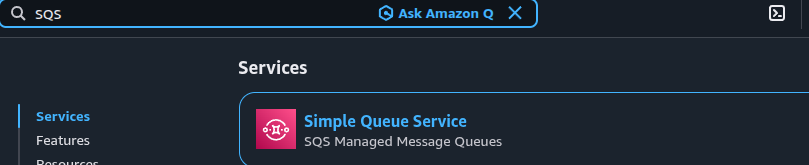
Log in to the AWS Management Console and open the Amazon SQS console.
-
Click Queues and select the required SQS queue.

-
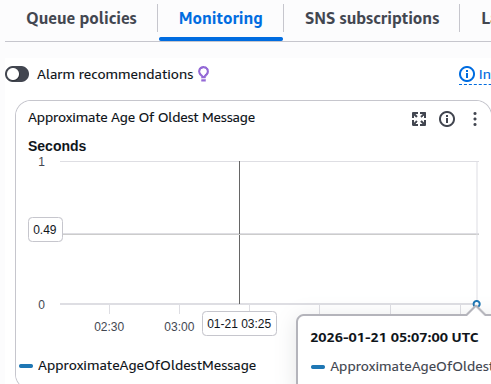
Open the Monitoring tab and verify that the metric ApproximateAgeOfOldestMessage is available and updating.
- If the metric is not present or messages are retained too long, click Edit.
-
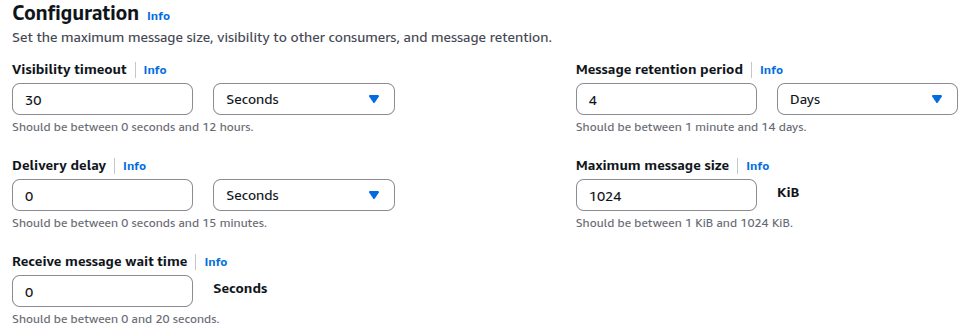
Under Details, configure the Message retention period to 4 days (345600 seconds) or higher.
- Click Save changes.
- Repeat these steps for all SQS queues.
Remediation via AWS CLI
-
Log in to the AWS Management Console and click the CloudShell icon (
>_) in the top-right corner.
-
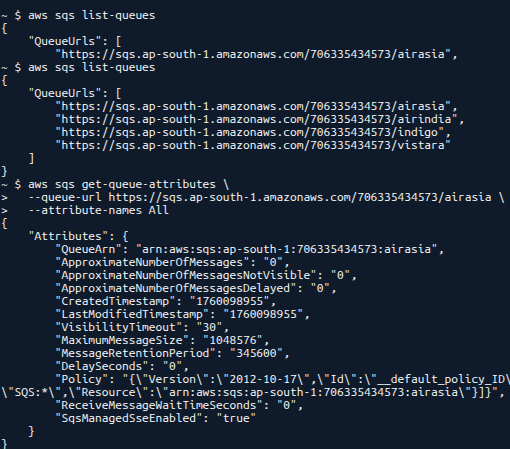
List all SQS queues:
aws sqs list-queues
-
Verify queue attributes:
aws sqs get-queue-attributes \
--queue-url <queue-url> \
--attribute-names All
-
Set the message retention period to 4 days:
aws sqs set-queue-attributes \
--queue-url <queue-url> \
--attributes MessageRetentionPeriod=345600
Updated on 06 March, 2026