Other Articles
- Cloud SQL – Configure Private IP
- Cloud SQL – Monitor CPU Utilization
- Cloud SQL – Enable Deletion Protection
- Cloud SQL – Enable Disk Encryption
- Cloud SQL – Enable Automated Backups
- Cloud SQL – Enable Log Export
- Cloud SQL – Enforce Password Validation
- Cloud SQL – Protect From Internet Access
- Cloud SQL – Enforce Secure Transport
- Compute Engine – Block Project-Wide SSH Keys
- Compute Engine – Disable IP Forwarding
- Compute Engine – Disable Public IP Addresses
- Compute Engine – Disable Serial Port Access
- Compute Engine – Enable Confidential Computing
- Compute Engine – Enable OS Login
- Compute Engine – Enable Shielded VM
- Compute Engine – Restrict Default Service Account
- General – Deny Public Access to KMS Keys
- General – Enforce Duties Separation
- General – Enforce KMS Key Rotation
- General – Restrict Admin Roles on Service Accounts
- Cloud Run – Configure Timeout Settings
- Cloud Storage – Enable Bucket Encryption
- Cloud Storage – Enable Bucket Logging
- Cloud Storage – Enable Bucket Versioning
- Cloud Storage – Enforce Uniform Bucket-Level Access
- Cloud Storage – Restrict Public Access
- IAM Users – Enforce GCP-Managed Keys
- IAM Users – Rotate External User-Managed Service Account Keys
- GKE – Enable Private Nodes
- GKE – Restrict Control Plane Access
- GKE – Enable Workload Identity
- GKE – Disable Legacy ABAC
- GKE – Enable Network Policy
- GKE – Enable Shielded Nodes
- GKE – Enable Node Auto-Upgrade and Auto-Repair
- GKE Cluster – Enable Cluster Logging
- General – Enable Cloud Audit Logs
- General – Configure a Log Sink
- General – Configure Log Bucket Retention
- Cloud SQL – Enable High Availability
- Cloud SQL – Configure Maintenance Window
- General – Enable Security Command Center
- Compute Engine – Enable Instance Deletion Protection
- VPC Firewall – Restrict Public SSH and RDP Access
- VPC Firewall – Restrict Public Database Access
- VPC Network – Avoid the Default Network
- VPC Network – Enable Subnet Flow Logs
Cloud Storage – Configure Bucket Retention or Lifecycle
Secure Configuration Checks > GCP
This check ensures that every Cloud Storage bucket has a retention policy or a lifecycle rule. A retention policy protects objects from early deletion. A lifecycle rule deletes or moves objects automatically as they age.
Check Details
- Resource: Cloud Storage Bucket
- Check: Configure bucket retention or lifecycle
- Risk: Without either one, objects stay forever and storage cost grows. Objects can also be deleted at any time with no protection.
Remediation via Google Cloud Console
-
Log in to the Google Cloud Console and navigate to
Cloud Storage > Buckets.

- Click on the affected bucket.
-
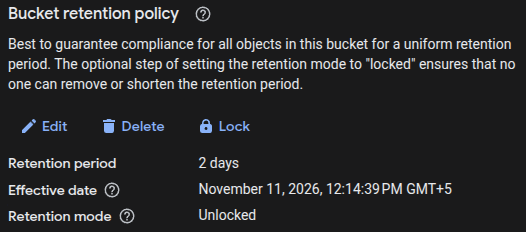
To set a retention policy, open the Protection tab.
Under Retention, click Set retention policy.
Enter a retention period and click Save.
-
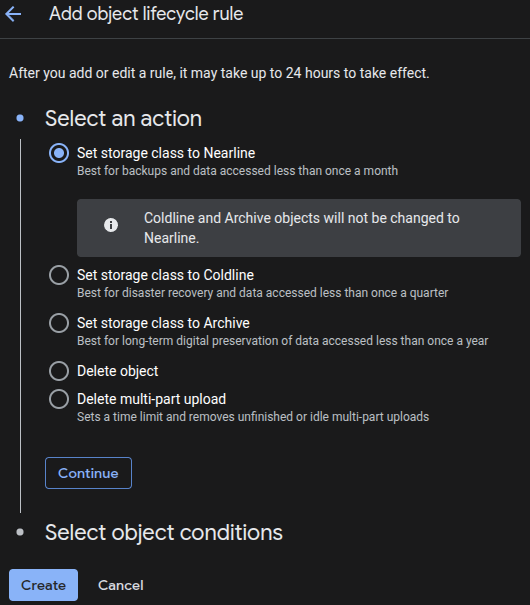
Or, to add a lifecycle rule, open the Lifecycle tab and click Add a rule.
Select an action, such as Delete object.
Set a condition, such as Age of 365 days.
Click Create.
- Repeat steps 2 to 4 for every bucket that has neither.
Remediation via Google Cloud CLI
-
Open the Google Cloud Console and launch
Cloud Shell.

-
List the buckets that have no retention policy and no lifecycle rule:
for B in $(gcloud storage buckets list --format="value(name)"); do OUT=$(gcloud storage buckets describe "gs://$B" \ --format="yaml(retention_policy,lifecycle_config)") [ -z "$OUT" ] && echo "$B" done -
Set a retention policy on the bucket:
gcloud storage buckets update gs://<BUCKET_NAME> --retention-period=<PERIOD>
Replace
<BUCKET_NAME>with your bucket name and<PERIOD>with a period such as30dor1y. Do not lock the policy unless you must. A locked policy cannot be removed. -
Or add a lifecycle rule. Create a file named
lifecycle.json:{ "rule": [ { "action": {"type": "Delete"}, "condition": {"age": 365} } ] }Then apply it to the bucket:
gcloud storage buckets update gs://<BUCKET_NAME> --lifecycle-file=lifecycle.json
This replaces any lifecycle rules that the bucket already has. A delete rule removes objects for good.
-
Verify the bucket configuration:
gcloud storage buckets describe gs://<BUCKET_NAME> \
--format="yaml(retention_policy,lifecycle_config)"

Default Value
By default, a bucket has no retention policy and no lifecycle rule. Objects stay until someone deletes them.
Updated on 09 November, 2026