Other Articles
- Cloud SQL – Configure Private IP
- Cloud SQL – Monitor CPU Utilization
- Cloud SQL – Enable Deletion Protection
- Cloud SQL – Enable Disk Encryption
- Cloud SQL – Enable Automated Backups
- Cloud SQL – Enable Log Export
- Cloud SQL – Enforce Password Validation
- Cloud SQL – Protect From Internet Access
- Cloud SQL – Enforce Secure Transport
- Compute Engine – Block Project-Wide SSH Keys
- Compute Engine – Disable IP Forwarding
- Compute Engine – Disable Public IP Addresses
- Compute Engine – Disable Serial Port Access
- Compute Engine – Enable Confidential Computing
- Compute Engine – Enable OS Login
- Compute Engine – Enable Shielded VM
- Compute Engine – Restrict Default Service Account
- General – Deny Public Access to KMS Keys
- General – Enforce Duties Separation
- General – Enforce KMS Key Rotation
- General – Restrict Admin Roles on Service Accounts
- Cloud Run – Configure Timeout Settings
- Cloud Storage – Enable Bucket Encryption
- Cloud Storage – Enable Bucket Logging
- Cloud Storage – Enable Bucket Versioning
- Cloud Storage – Enforce Uniform Bucket-Level Access
- Cloud Storage – Restrict Public Access
- IAM Users – Enforce GCP-Managed Keys
- IAM Users – Rotate External User-Managed Service Account Keys
- GKE – Enable Private Nodes
- GKE – Restrict Control Plane Access
- GKE – Enable Workload Identity
- GKE – Disable Legacy ABAC
- GKE – Enable Network Policy
- GKE – Enable Shielded Nodes
- GKE – Enable Node Auto-Upgrade and Auto-Repair
- GKE Cluster – Enable Cluster Logging
- General – Enable Cloud Audit Logs
- General – Configure a Log Sink
- General – Configure Log Bucket Retention
- Cloud SQL – Enable High Availability
- Cloud SQL – Configure Maintenance Window
- Cloud Storage – Configure Bucket Retention or Lifecycle
- General – Enable Security Command Center
- Compute Engine – Enable Instance Deletion Protection
- VPC Firewall – Restrict Public Database Access
- VPC Network – Avoid the Default Network
- VPC Network – Enable Subnet Flow Logs
VPC Firewall – Restrict Public SSH and RDP Access
Secure Configuration Checks > GCP
This check ensures that no VPC firewall rule allows SSH (port 22) or RDP (port 3389) from the entire internet. Open remote access ports are scanned and attacked within minutes.
Check Details
- Resource: VPC Network (firewall rules)
- Check: Restrict public SSH and RDP access
- Risk: Attackers can try brute force attacks and exploit remote access flaws. A successful attack gives them control of the instance.
Remediation via Google Cloud Console
-
Log in to the Google Cloud Console and navigate to
VPC network > Firewall.

-
Find each ingress rule that allows
tcp:22ortcp:3389from the source0.0.0.0/0or::/0. -
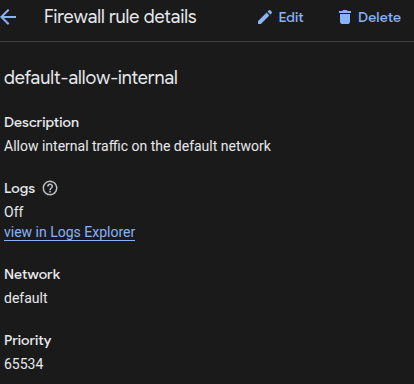
Click the rule name, then click Edit.
-
Under Source IPv4 ranges, replace
0.0.0.0/0with a trusted IP range. To use Identity-Aware Proxy, enter35.235.240.0/20.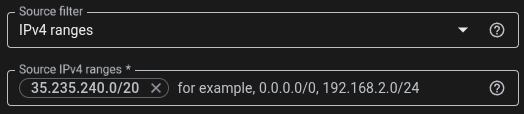
- Click Save to apply the changes.
- If the rule is not needed, select it and click Delete instead.
- Repeat steps 2 to 6 for every affected rule.
Remediation via Google Cloud CLI
-
Open the Google Cloud Console and launch
Cloud Shell.

-
List the enabled ingress rules that are open to the internet:
gcloud compute firewall-rules list \
--filter='direction=INGRESS AND disabled=false AND (sourceRanges:"0.0.0.0/0" OR sourceRanges:"::/0")' \
--format="table(name,network.basename(),sourceRanges.list(),allowed[].map().firewall_rule().list())"
A rule is non-compliant if it allows
tcp:22,tcp:3389, a port range that includes them, or all protocols. -
Limit the source of the rule to a trusted range:
gcloud compute firewall-rules update <RULE_NAME> --source-ranges=<TRUSTED_CIDR>
Replace
<RULE_NAME>with the rule name and<TRUSTED_CIDR>with your range, for example203.0.113.10/32. To use Identity-Aware Proxy, use35.235.240.0/20. If the rule also allows other ports, create a separate rule for them first. -
Or delete the rule if it is not needed:
gcloud compute firewall-rules delete <RULE_NAME>
-
Verify the rule:
gcloud compute firewall-rules describe <RULE_NAME> \
--format="yaml(name,sourceRanges,allowed)"

Default Value
The default network has the rules default-allow-ssh and default-allow-rdp.
Both allow access from 0.0.0.0/0.
Custom networks have no such rules, because ingress traffic is denied by default.
Updated on 09 November, 2026