Other Articles
- Cloud SQL – Configure Private IP
- Cloud SQL – Monitor CPU Utilization
- Cloud SQL – Enable Deletion Protection
- Cloud SQL – Enable Disk Encryption
- Cloud SQL – Enable Automated Backups
- Cloud SQL – Enable Log Export
- Cloud SQL – Enforce Password Validation
- Cloud SQL – Protect From Internet Access
- Cloud SQL – Enforce Secure Transport
- Compute Engine – Block Project-Wide SSH Keys
- Compute Engine – Disable IP Forwarding
- Compute Engine – Disable Public IP Addresses
- Compute Engine – Disable Serial Port Access
- Compute Engine – Enable Confidential Computing
- Compute Engine – Enable OS Login
- Compute Engine – Enable Shielded VM
- Compute Engine – Restrict Default Service Account
- General – Deny Public Access to KMS Keys
- General – Enforce Duties Separation
- General – Enforce KMS Key Rotation
- General – Restrict Admin Roles on Service Accounts
- Cloud Run – Configure Timeout Settings
- Cloud Storage – Enable Bucket Encryption
- Cloud Storage – Enable Bucket Logging
- Cloud Storage – Enable Bucket Versioning
- Cloud Storage – Enforce Uniform Bucket-Level Access
- Cloud Storage – Restrict Public Access
- IAM Users – Enforce GCP-Managed Keys
- IAM Users – Rotate External User-Managed Service Account Keys
- GKE – Enable Private Nodes
- GKE – Restrict Control Plane Access
- GKE – Enable Workload Identity
- GKE – Disable Legacy ABAC
- GKE – Enable Network Policy
- GKE – Enable Shielded Nodes
- GKE – Enable Node Auto-Upgrade and Auto-Repair
- GKE Cluster – Enable Cluster Logging
- General – Enable Cloud Audit Logs
- General – Configure a Log Sink
- General – Configure Log Bucket Retention
- Cloud SQL – Enable High Availability
- Cloud Storage – Configure Bucket Retention or Lifecycle
- General – Enable Security Command Center
- Compute Engine – Enable Instance Deletion Protection
- VPC Firewall – Restrict Public SSH and RDP Access
- VPC Firewall – Restrict Public Database Access
- VPC Network – Avoid the Default Network
- VPC Network – Enable Subnet Flow Logs
Cloud SQL – Configure Maintenance Window
Secure Configuration Checks > GCP
This check ensures that Cloud SQL instances have a maintenance window. Updates, including minor version upgrades, are then applied at a time that you plan.
Check Details
- Resource: Cloud SQL Instance
- Check: Configure Cloud SQL maintenance window
- Risk: Without a maintenance window, updates can start at any time. They can cause a short outage during business hours.
Remediation via Google Cloud Console
-
Log in to the Google Cloud Console and navigate to
Cloud SQL.
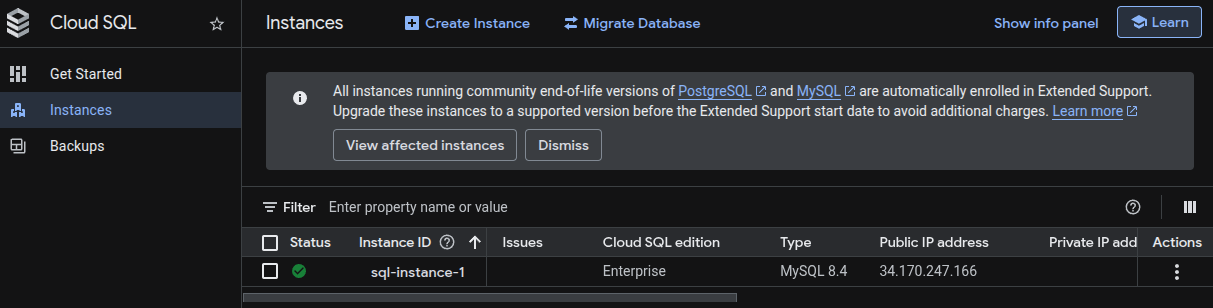
- Click on the affected Cloud SQL instance.
-
Click Edit to modify the instance configuration.

-
Expand Customize your instance and scroll to the
Maintenance section.
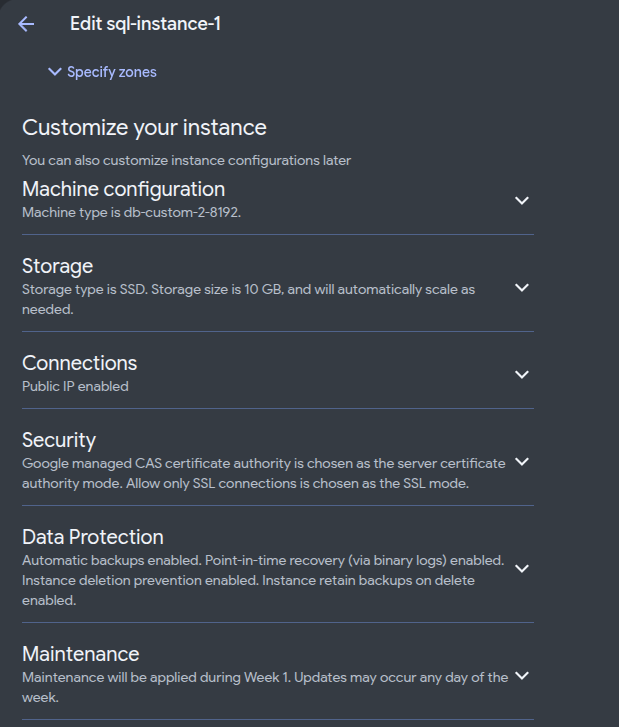
-
Under Maintenance section, select a Maintenance timing and window
in a period of low traffic.
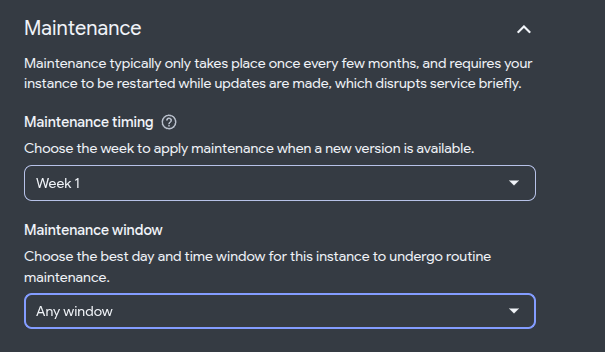
- Click Save to apply the changes.
Remediation via Google Cloud CLI
-
Open the Google Cloud Console and launch
Cloud Shell.
-
List the instances that have no maintenance window:
gcloud sql instances list \
--filter="NOT settings.maintenanceWindow.day:*" \
--format="table(name,region)"
-
Set a maintenance window on the Cloud SQL instance:
gcloud sql instances patch <INSTANCE_NAME> \
--maintenance-window-day=<DAY> \
--maintenance-window-hour=<HOUR>
Replace
<INSTANCE_NAME>with your Cloud SQL instance name. Replace<DAY>with a day such asSUN. Replace<HOUR>with an hour from0to23, for example2. The hour is in UTC. -
Verify the maintenance window:
gcloud sql instances describe <INSTANCE_NAME> \
--format="yaml(settings.maintenanceWindow)"
Default Value
By default, no maintenance window is set. Cloud SQL can then start maintenance at any time. Maintenance can cause a short outage.
Updated on 09 November, 2026