Other Articles
- SQL Database – Enable Database Encryption
- SQL Databases – Enable Backup
- SQL Database – Monitor CPU Utilization
- SQL Database – Monitor IO Utilization
- SQL Database – Monitor Memory Utilization
- SQL Database – Protect From Direct Internet Traffic
- SQL Server – Enable SQL Defender
- SQL Server – Require Microsoft Entra-Only Authentication
- SQL Server – Block Public Firewall Rules
- SQL Server – Enable Auditing
- Storage Account – Enable Storage Encryption
- Storage Account – Disable Blob Public Access
- Storage Account – Disable Cross-Tenant Replication
- Storage Account – Disable Public Network Access
- Storage Account – Enable Microsoft Defender
- Storage Account – Enable Secure Transfer
- Storage Account – Enforce Minimum TLS Version
- Storage Account – Enforce Network Access Rule
- Storage Account – Enforce Private Endpoint Access
- Storage Account – Enable Blob Versioning
- User – Enable Azure MFA
- App Service – Disable Remote Debugging
- App Service – Enable Defender
- App Service – Enable Entra ID Registration
- App Service – Enable HTTP2
- App Service – Enforce Latest TLS Version
- App Service – Enforce Secure FTPS State
- App Service – Monitor Server Errors
- App Service – Redirect HTTP to HTTPS
- Cosmos DB – Enable Backup
- Cosmos DB – Enable Microsoft Defender
- Cosmos DB – Monitor Latency
- Cosmos DB – Ensure Private Connectivity
- Cosmos DB for PostgreSQL – Monitor CPU Utilization
- Cosmos DB for PostgreSQL – Monitor IO Utilization
- Cosmos DB for PostgreSQL – Monitor Memory Utilization
- Cosmos DB for PostgreSQL – Protect From Direct Internet Traffic
- Cosmos DB – Protect From Direct Internet Traffic
- Cosmos DB – Restrict Firewall Network Access
- Virtual Machine – Enable Defender
- Virtual Machine – Protect From Direct Internet Traffic
- Key Vault – Enable Defender
- Key Vault – Ensure Vault Recoverable
- Key Vault – Require Private Endpoint Access
- Key Vault – Enforce Keys Expiration
- Key Vault – Enable Purge Protection
- Key Vault – Use Azure RBAC Authorization
- MySQL Flexible Server – Enable Audit Log Events Connection
- MySQL Flexible Server – Enable Audit Logs
- MySQL Flexible Server – Enforce Minimum TLS Version
- PostgreSQL Flexible Server – Configure Log File Retention
- PostgreSQL Flexible Server – Enable Connection Logging
- PostgreSQL Flexible Server – Enable Connection Throttling
- PostgreSQL Flexible Server – Enable Disconnection Logging
- PostgreSQL Flexible Server – Enable Log Checkpoints
- Network Security Group – Ensure Flow Logs Captured
- General – Enable Auto Provisioning Log Analytics
- General – Enable Security Notifications
- General – Set Additional Email Address
- Cosmos DB – Enforce Minimum TLS Version
- PostgreSQL Flexible Server – Enforce Minimum TLS Version
- Container Instance – Enforce Use of Private Virtual Networks
- Container Instance – Enforce Managed Identity Usage
Storage Account – Enable Blob Soft Delete
Secure Configuration Checks > Azure
This check ensures that blob soft delete is enabled for Azure Storage Accounts. When soft delete is enabled, deleted blobs and blob snapshots are kept for a set number of days, so they can be recovered if they are removed by mistake or by a malicious actor.
Check Details
- Resource: Storage Account
- Check: Enable Blob Soft Delete
- Risk: If blob soft delete is disabled, blobs that are deleted or overwritten cannot be recovered, increasing the risk of permanent data loss from accidental deletion or malicious activity.
Remediation via Azure Portal
-
Log in to the Azure Portal.

-
Navigate to Storage accounts and select the affected storage account.
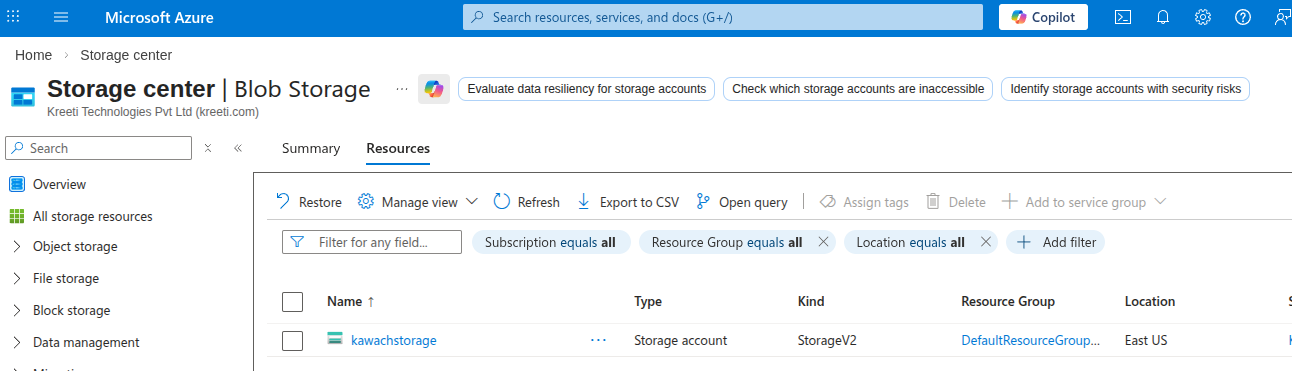
- In the left menu, click on Data protection under Data management.
-
In the Recovery section, select Enable soft delete for blobs
and set Keep deleted blobs for (in days) to the number of days you want to
retain deleted blobs (for example, 7).
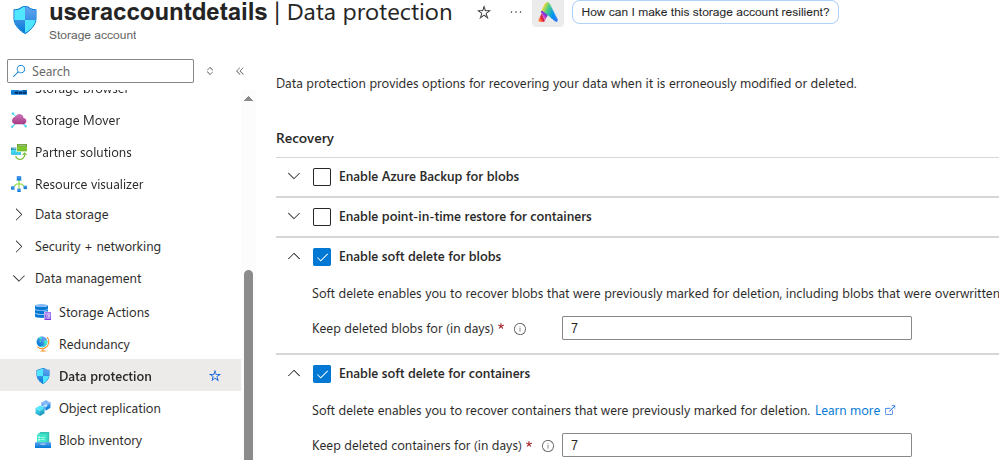
- Click Save to apply the changes.
Remediation via Azure CLI
-
Open Azure Cloud Shell from the Azure Portal or use a local
terminal with Azure CLI installed.

-
Run the following command to enable blob soft delete:
az storage account blob-service-properties update \
--account-name <storage-account-name> \
--resource-group <resource-group-name> \
--enable-delete-retention true \
--delete-retention-days <retention-days>
Replace
<storage-account-name>,<resource-group-name>and<retention-days>with your actual values. The retention period can be set between 1 and 365 days.
Updated on 03 November, 2026