Other Articles
- SQL Database – Enable Database Encryption
- SQL Server – Enable SQL Defender
- SQL Database – Monitor CPU Utilization
- SQL Database – Monitor IO Utilization
- SQL Database – Monitor Memory Utilization
- SQL Database – Protect From Direct Internet Traffic
- Storage Account – Enable Storage Encryption
- Storage Account – Disable Blob Public Access
- Storage Account – Disable Cross-Tenant Replication
- Storage Account – Disable Public Network Access
- Storage Account – Enable Microsoft Defender
- Storage Account – Enable Secure Transfer
- Storage Account – Enforce Minimum TLS Version
- Storage Account – Enforce Network Access Rule
- Storage Account – Enforce Private Endpoint Access
- User – Enable Azure MFA
- App Service – Disable Remote Debugging
- App Service – Enable Defender
- App Service – Enable Entra ID Registration
- App Service – Enable HTTP2
- App Service – Enforce Latest TLS Version
- App Service – Enforce Secure FTPS State
- App Service – Monitor Server Errors
- App Service – Redirect HTTP to HTTPS
- Cosmos DB – Enable Backup
- Cosmos DB – Enable Microsoft Defender
- Cosmos DB – Monitor Latency
- Cosmos DB – Ensure Private Connectivity
- Cosmos DB for PostgreSQL – Monitor CPU Utilization
- Cosmos DB for PostgreSQL – Monitor IO Utilization
- Cosmos DB for PostgreSQL – Monitor Memory Utilization
- Cosmos DB for PostgreSQL – Protect From Direct Internet Traffic
- Cosmos DB – Protect From Direct Internet Traffic
- Cosmos DB – Restrict Firewall Network Access
- Virtual Machine – Enable Defender
- Virtual Machine – Protect From Direct Internet Traffic
- Key Vault – Enable Defender
- Key Vault – Ensure Vault Recoverable
- Key Vault – Require Private Endpoint Access
- MySQL Flexible Server – Enable Audit Logs
- MySQL Flexible Server – Enforce Minimum TLS Version
- PostgreSQL Flexible Server – Configure Log File Retention
- PostgreSQL Flexible Server – Enable Connection Logging
- PostgreSQL Flexible Server – Enable Connection Throttling
- PostgreSQL Flexible Server – Enable Disconnection Logging
- PostgreSQL Flexible Server – Enable Log Checkpoints
- Network Security Group – Ensure Flow Logs Captured
- General – Enable Auto Provisioning Log Analytics
- General – Enable Security Notifications
- General – Set Additional Email Address
MySQL Flexible Server – Enable Audit Log Events Connection
This check ensures that the audit_log_events server parameter includes the CONNECTION event for Azure MySQL Flexible Server. Enabling connection audit logging helps monitor database access activity and supports security investigations and compliance requirements.
Check Details
- Resource: Azure Database for MySQL Flexible Server
- Check: Ensure audit_log_events Includes CONNECTION
- Risk: If connection events are not logged, unauthorized access attempts, suspicious logins, or brute-force attacks may go undetected. This can hinder incident response efforts and reduce overall visibility into database access activity.
Remediation via Azure Portal
-
Log in to the Azure Portal.

-
Navigate to Azure Database for MySQL Flexible Servers and select the affected server.

-
In the left-hand menu, select Server parameters under Settings.
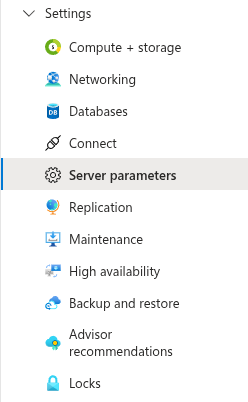
- Search for the parameter audit_log_events.
-
Ensure the value includes CONNECTION.
If not present, modify the value to include CONNECTION along with any existing audit event
types.
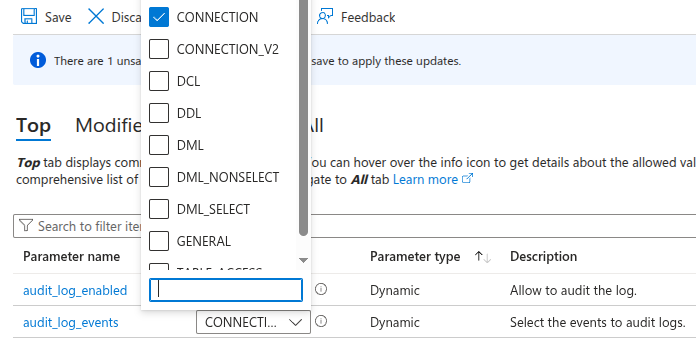
- Click Save to apply the changes. A server restart may be required for the configuration to take effect.
Remediation via Azure CLI
-
Open Azure Cloud Shell or a local terminal with Azure CLI installed.

-
Check the current value of the audit_log_events parameter:
az mysql flexible-server parameter show \
 --resource-group <resource-group> \
 --server-name <mysql-server-name> \
 --name audit_log_events
-
Update the parameter to include CONNECTION:
az mysql flexible-server parameter set \
 --resource-group <resource-group> \
 --server-name <mysql-server-name> \
 --name audit_log_events \
 --value CONNECTION
-
Verify that the parameter now includes CONNECTION:
az mysql flexible-server parameter show \
 --resource-group <resource-group> \
 --server-name <mysql-server-name> \
 --name audit_log_events \
 --query value
Replace <resource-group> and
<mysql-server-name> with your actual values.
The output should confirm that CONNECTION is included in the parameter value.