Other Articles
- SQL Database – Enable Database Encryption
- SQL Server – Enable SQL Defender
- SQL Database – Monitor CPU Utilization
- SQL Database – Monitor IO Utilization
- SQL Database – Monitor Memory Utilization
- SQL Database – Protect From Direct Internet Traffic
- Storage Account – Enable Storage Encryption
- Storage Account – Disable Blob Public Access
- Storage Account – Disable Cross-Tenant Replication
- Storage Account – Disable Public Network Access
- Storage Account – Enable Microsoft Defender
- Storage Account – Enable Secure Transfer
- Storage Account – Enforce Minimum TLS Version
- Storage Account – Enforce Network Access Rule
- Storage Account – Enforce Private Endpoint Access
- User – Enable Azure MFA
- App Service – Disable Remote Debugging
- App Service – Enable Defender
- App Service – Enable Entra ID Registration
- App Service – Enable HTTP2
- App Service – Enforce Latest TLS Version
- App Service – Enforce Secure FTPS State
- App Service – Monitor Server Errors
- App Service – Redirect HTTP to HTTPS
- Cosmos DB – Enable Backup
- Cosmos DB – Enable Microsoft Defender
- Cosmos DB – Monitor Latency
- Cosmos DB – Ensure Private Connectivity
- Cosmos DB for PostgreSQL – Monitor CPU Utilization
- Cosmos DB for PostgreSQL – Monitor IO Utilization
- Cosmos DB for PostgreSQL – Protect From Direct Internet Traffic
- Cosmos DB – Protect From Direct Internet Traffic
- Cosmos DB – Restrict Firewall Network Access
- Virtual Machine – Enable Defender
- Virtual Machine – Protect From Direct Internet Traffic
- Key Vault – Enable Defender
- Key Vault – Ensure Vault Recoverable
- Key Vault – Require Private Endpoint Access
- MySQL Flexible Server – Enable Audit Log Events Connection
- MySQL Flexible Server – Enable Audit Logs
- MySQL Flexible Server – Enforce Minimum TLS Version
- PostgreSQL Flexible Server – Configure Log File Retention
- PostgreSQL Flexible Server – Enable Connection Logging
- PostgreSQL Flexible Server – Enable Connection Throttling
- PostgreSQL Flexible Server – Enable Disconnection Logging
- PostgreSQL Flexible Server – Enable Log Checkpoints
- Network Security Group – Ensure Flow Logs Captured
- General – Enable Auto Provisioning Log Analytics
- General – Enable Security Notifications
- General – Set Additional Email Address
Cosmos DB for PostgreSQL – Monitor Memory Utilization
This check ensures that memory utilization is actively monitored for Azure Cosmos DB for PostgreSQL clusters to maintain optimal performance, prevent resource exhaustion, and support high availability requirements.
Check Details
- Resource: Azure Cosmos DB for PostgreSQL
- Check: Ensure Memory utilization Is Monitored
- Risk: Failure to monitor memory utilization may result in degraded performance, query failures, unexpected downtime, and potential service disruption due to resource exhaustion.
Remediation via Azure Portal
-
Log in to the Azure Portal.

-
Navigate to Azure Cosmos DB for PostgreSQL and select the relevant cluster.

-
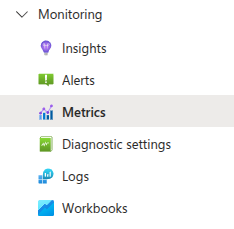
Under Monitoring, select Metrics.
-
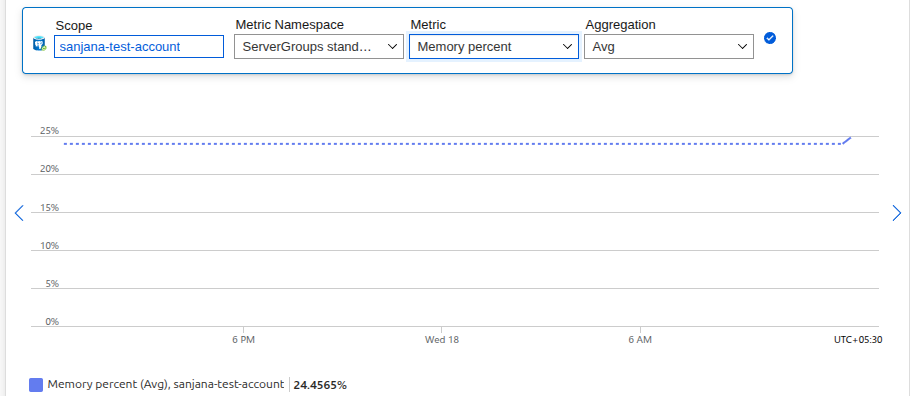
From the metric drop-down list, select Memory percent.
-
Configure a Metric alert to trigger when memory utilization exceeds a defined threshold (for example, 80%).
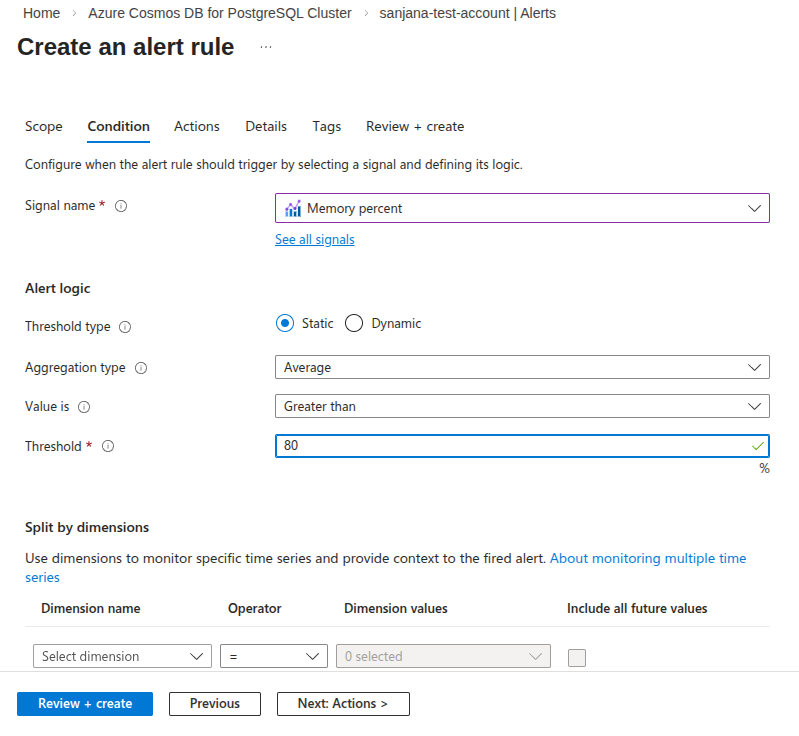
- Save the alert rule to ensure continuous monitoring.
Remediation via Azure CLI
-
Open Azure Cloud Shell or a local terminal with Azure CLI installed.

-
Retrieve available metrics for the PostgreSQL cluster:
az monitor metrics list-definitions \
 --resource <resource-id>
-
Create a metric alert for memory utilization:
az monitor metrics alert create \
 --name <alert-name> \
 --resource-group <resource-group> \
 --scopes <resource-id> \
 --condition "avg MemoryPercent > 80" \
 --description "Alert when memory utilization exceeds 80 percent" \
 --evaluation-frequency 5m \
 --window-size 5m \
 --severity 2
-
Verify that the alert rule has been created:
az monitor metrics alert list \
 --resource-group <resource-group>
Replace <resource-id>,
<resource-group>, and
<alert-name> with your actual values.
The alert ensures continuous monitoring of memory utilization and supports proactive performance management.