Other Articles
Send Questionnaire Requests to Vendors
Questionnaires are a core component of the Vendor Management process in Kawach. They allow your organization to collect structured information directly from vendors regarding:
- Information security practices
- Data protection measures
- Regulatory compliance
- Operational controls
- Business continuity readiness
- Certifications and attestations
By sending standardized questionnaires, you ensure that vendor assessments are consistent, auditable, and risk-based.
Why Questionnaire Requests Matter
Vendor risk cannot be evaluated solely based on contracts or reputation, Structured questionnaires help you:
- Assess data handling practices
- Identify gaps in security controls
- Validate certifications (ISO, SOC, etc.)
- Confirm compliance with applicable regulations
- Maintain documented due diligence
This is especially critical for high-risk vendors or vendors handling sensitive data.
Questionnaire Request Details
Each questionnaire request contains the following fields:
Vendor
The name of the vendor to whom the questionnaire is sent.
Vendor Category
Indicates the classification of the vendor (e.g., Cloud Provider, SaaS, IT Services, HR Services). This ensures the right questionnaire type is assigned.
Created By
The user who initiated the questionnaire request.
Sent On
The date the questionnaire was officially issued to the vendor.
Due Date
The deadline by which the vendor must complete and submit the questionnaire.
Clear due dates help enforce accountability and prevent assessment delays.
Status
Indicates the progress of the request:
- Draft
- Sent
- In Progress
- Submitted
- Reviewed
- Overdue
This enables proactive follow-up and tracking.
How to Send a Questionnaire
Follow these steps to issue a questionnaire to a vendor:
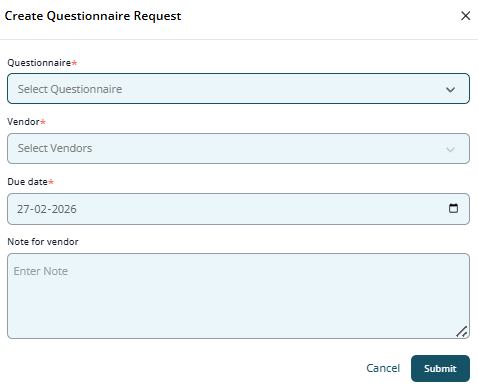
Step 1: Go to Questionnaire Requests
Navigate to the Questionnaire Requests section from the Vendor Management module.
Step 2: Select Vendor and Questionnaire
- Choose the appropriate vendor.
- Select the relevant questionnaire template from the library.
Ensure that the questionnaire aligns with:
- Vendor risk level
- Service category
- Regulatory exposure
Step 3: Set a Due Date
Define a reasonable deadline based on:
- Vendor criticality
- Regulatory timelines
- Internal review cycles
High-risk vendors may require stricter timelines.
Step 4: Send the Request
Click Send to issue the questionnaire.
Once sent:
- The vendor receives notification
- Status updates begin tracking automatically
- The request is logged for audit purposes
Tracking & Follow-Up
From the Questionnaire Requests dashboard, you can:
- Monitor response progress
- Identify overdue submissions
- Send reminders
- Review completed responses
- Record review comments
- Approve or request clarification
This ensures continuous visibility and accountability.
Questionnaire Requests list

Use the Questionnaire Library
The Questionnaire Library is a centralized repository of all assessment templates used in vendor evaluations.
A structured library ensures:
- Standardization across vendors
- Reusability of assessment templates
- Consistency in risk evaluation
- Audit-ready documentation
Questionnaire Library view

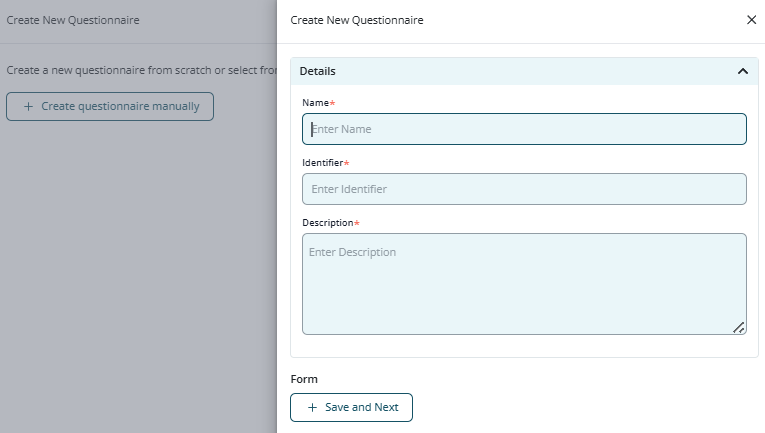
Identifier
A unique reference code for the questionnaire (e.g., QST-SEC-001).
Name
The title of the questionnaire.
Example: “Information Security Assessment – High Risk Vendors”.
Description
Explains:
- Purpose of the questionnaire
- Applicable vendor category
- Scope of assessment
- Expected review frequency
Created By
Indicates the user who created the template.
Created On
Date the template was added to the system.
Benefits of a Centralized Questionnaire Library
Standardization
Ensures all vendors within a specific category are assessed using the same criteria.
Efficiency
Eliminates the need to create new questionnaires repeatedly.
Audit Readiness
Maintains documented evidence of due diligence processes.
Risk-Based Customization
Allows different templates for:
- Low-risk vendors
- Medium-risk vendors
- High-risk vendors
- Data processors
- Critical infrastructure providers
Best Practices for Questionnaire Management
- Maintain separate templates by risk level
- Review templates annually to align with regulatory changes
- Keep questionnaires concise but comprehensive
- Include both objective (Yes/No) and descriptive questions
- Attach document upload requirements where necessary
- Track response turnaround time
- Escalate overdue high-risk vendor assessments
- Maintain review comments for each submission
How It Strengthens Compliance
The Questionnaire workflow supports:
- ISO 27001 Supplier Security controls
- SOC 2 Vendor Monitoring requirements
- GDPR Article 28 Data Processor assessments
- Third-Party Risk Management (TPRM) best practices
By using structured templates and tracking responses centrally, Kawach enables systematic vendor oversight and documented due diligence.
Summary
Steps 4 and 5 of Vendor Management — sending questionnaire requests and maintaining a centralized Questionnaire Library — ensure that vendor assessments are structured, consistent, and risk-driven.
Together, they enable organizations to:
- Collect critical compliance information
- Monitor response timelines
- Identify risk gaps
- Maintain audit evidence
- Strengthen third-party governance
With proper implementation, the questionnaire process transforms vendor oversight from reactive follow-ups into a proactive, controlled, and documented risk management system within Kawach.