Other Articles
Getting Started with Vendor Management
Support > Vendor Management
11 February, 2026
The Vendor Management module in Kawach enables organizations to systematically onboard vendors, assess third-party risks, monitor compliance checks, and maintain continuous oversight throughout the vendor lifecycle.
Effective vendor management is critical for:
- Reducing third-party risk
- Meeting regulatory and audit requirements
- Preventing data breaches and operational disruptions
- Ensuring contractual and compliance alignment
- Maintaining transparency across departments
This guide provides a detailed walkthrough of each section and workflow within the Vendor Management module.
Step 1: Understand the Vendor Overview
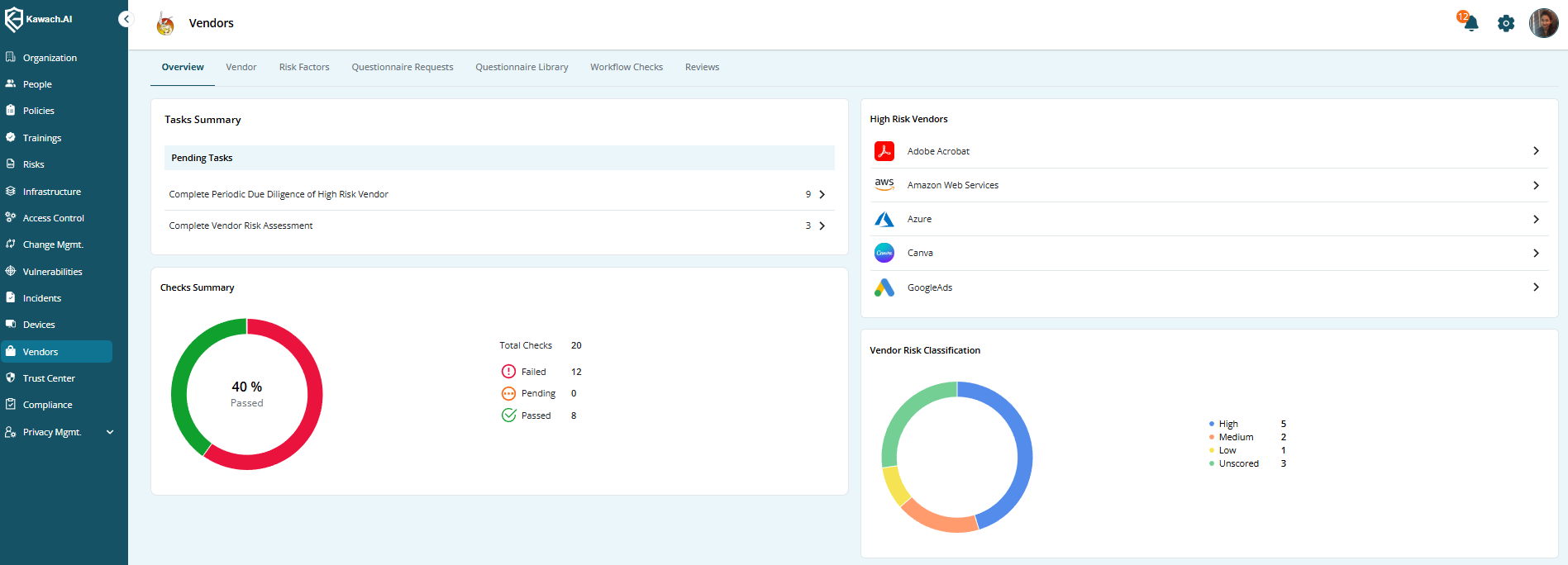
The Overview section provides a centralized snapshot of your vendor ecosystem and risk posture. It is designed for quick decision-making and executive visibility.
What You’ll See
Vendor Summary
Displays the total number of vendors added to the system.
This provides visibility into your third-party footprint.
High-Risk Vendors
Shows the number of vendors classified as High Risk.
These vendors typically:
- Handle sensitive data
- Provide critical business services
- Have access to internal systems
- Operate in highly regulated environments
This section helps you prioritize oversight and reviews.
Checks Summary
A consolidated view of compliance assessments across vendors:
- Total Checks
- Passed Checks
- Failed Checks
- Pending Checks
This enables compliance teams to immediately identify bottlenecks or risk exposures.
Vendor Risk Classification
Displays distribution by risk level:
- Low Risk
- Medium Risk
- High Risk
Often represented visually through charts or summary metrics for easier interpretation.
Why the Overview Matters
The dashboard allows you to:
- Identify critical vendors instantly
- Track compliance health at a glance
- Prioritize remediation efforts
- Prepare for audits with real-time visibility
- Support leadership reporting
Vendor Overview dashboard
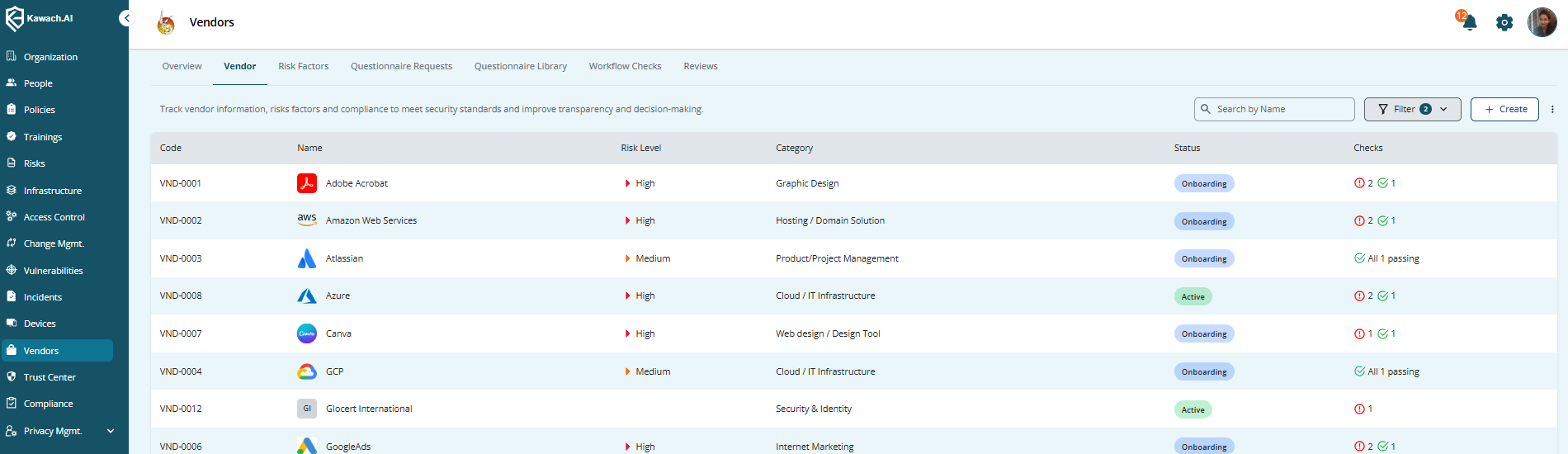
The Vendors section is where all third-party records are created, maintained, and reviewed. This acts as your centralized vendor repository.
Information Tracked for Each Vendor
Code
A unique identifier for internal tracking and referencing.
Name
Official legal or business name of the vendor.
Risk Level
Assigned based on data sensitivity, service criticality, regulatory exposure, and system access.
Category
Defines vendor type, such as:
- Cloud Service Provider
- IT Services
- HR Services
- Legal Consultant
- Payment Processor
- SaaS Provider
Status
Indicates lifecycle stage:
- Active
- Under Review
- Suspended
- Terminated
Checks
Displays associated compliance assessments and their status.
Step 2: Add and Manage Vendors
How to Add a Vendor
You can onboard vendors either:
- Manually (recommended for individual onboarding)
- Via Bulk Upload (recommended for large migrations or multiple additions)
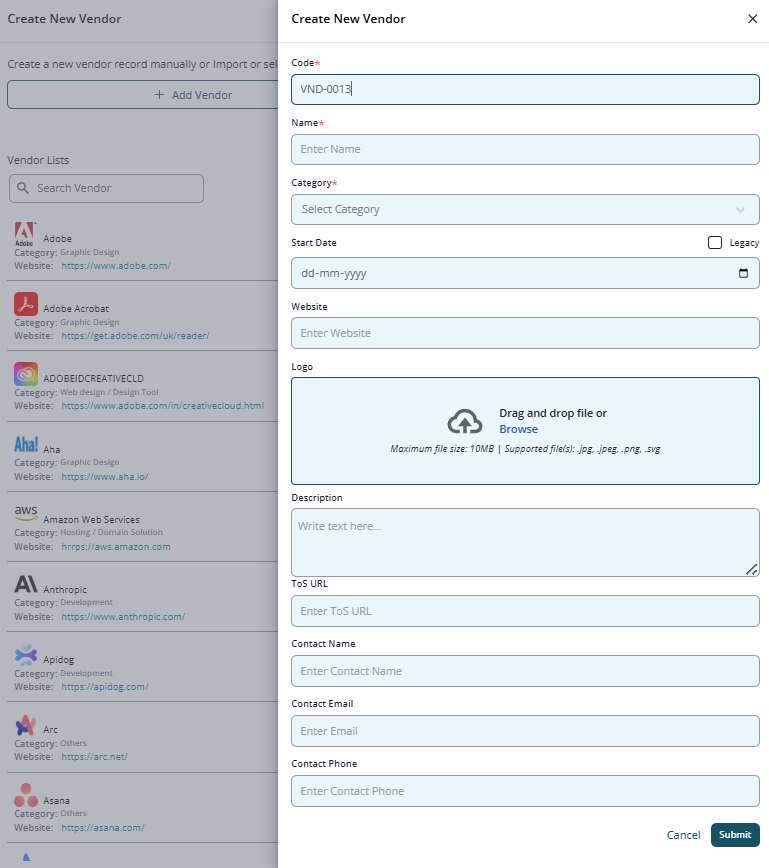
Add Vendor Manually
Step 1: Navigate to Vendors
Click Add Vendor.
Step 2: Fill in Vendor Details
Code
Enter a unique vendor identifier (e.g., VND-0012).
Name
Enter the official vendor name.
Category
Select the appropriate classification.
Start Date
Specify the engagement start date.
Website
Provide the vendor’s official website URL.
Logo
Upload via drag-and-drop or browse functionality.
Description
Add a brief overview of:
- Services provided
- Data handled
- Operational scope
- Business dependency
ToS URL
Link to the vendor’s Terms of Service.
Contact Information
- Contact Name – Primary point of contact
- Contact Email – Official business email
- Contact Phone – Contact number
Step 3: Click Submit
After submission:
- Vendor record is created
- Risk classification can be assigned
- Compliance checks can be initiated
- Activity logs are updated for audit purposes
Vendor Risk & Compliance Checks
Once vendors are added, you can:
- Assign compliance questionnaires
- Conduct risk assessments
- Record review comments
- Track remediation efforts
- Approve or reject vendors
Checks may include:
- Security questionnaires
- Data protection assessments
- Regulatory compliance reviews
- Contract validation
- Certification verification (ISO, SOC, etc.)
Vendor Lifecycle Management
Vendor management is not a one-time task — it is an ongoing process.
The lifecycle typically includes:
- Onboarding
- Risk Assessment
- Compliance Checks
- Approval
- Continuous Monitoring
- Periodic Review
- Renewal or Termination
Kawach ensures all actions are logged and traceable.
Vendor list view
Add Vendor form
Best Practices for Effective Vendor Management
Standardize Vendor Codes
Adopt a consistent naming convention for easier tracking and reporting.
Assign Risk Levels Early
Classify vendors during onboarding to prevent delays in assessments.
Use Category-Based Questionnaires
Tailor assessments to vendor type to avoid irrelevant or excessive checks.
Monitor High-Risk Vendors Regularly
Schedule quarterly or semi-annual reviews.
Keep Risk Factors Updated
Adapt risk scoring as:
- Regulations evolve
- Business reliance changes
- Data sensitivity increases
Follow Up on Pending Checks
Delays in compliance reviews can expose the organization to risk.
Add Clear Review Comments
Document decisions and rationale for audit transparency.
Use Bulk Uploads Strategically
Efficient when onboarding multiple vendors simultaneously.
Compliance & Governance Alignment
The Vendor Management module supports frameworks such as:
- ISO 27001 (Supplier Relationships – Clause 5 & 8 controls)
- SOC 2 (Vendor Risk & Third-Party Oversight)
- GDPR (Data Processor Due Diligence)
- HIPAA (Business Associate Agreements)
It provides structured evidence of:
- Risk-based vendor classification
- Documented assessments
- Approval workflows
- Continuous monitoring
Summary
The Vendor Management module in Kawach provides a structured, transparent, and audit-ready framework to manage third-party vendors.
By leveraging:
- Centralized vendor records
- Risk classification
- Compliance checks
- Lifecycle tracking
- Real-time dashboards
Organizations can significantly reduce third-party risk, improve operational resilience, and strengthen regulatory compliance.
With proper use and adherence to best practices, vendor oversight becomes proactive rather than reactive — helping your organization maintain security, trust, and governance excellence.
Read Next
Define Risk Factors
Configure structured risk criteria to enable automated vendor classification and risk-based governance.
Vendor Questionnaire
Create and manage vendor questionnaires to assess compliance, security posture, and regulatory alignment.
Vendor Lifecycle Management
Understand the complete vendor lifecycle from onboarding and risk assessment to monitoring, renewal, and termination.