Other Articles
Define Risk Factors
Risk Factors are the foundation of effective vendor risk assessment in Kawach. They help your organization systematically evaluate how a vendor could impact:
- Information security
- Data privacy
- Regulatory compliance
- Business continuity
- Financial stability
- Operational resilience
Instead of relying on assumptions, Risk Factors allow you to apply structured, measurable criteria when classifying vendors.
Why Risk Factors Are Important
Well-defined Risk Factors ensure that vendor classification is not arbitrary but based on consistent evaluation standards.
1. Identify Potential Vendor Risks Early
By defining risk indicators in advance, you can detect red flags during onboarding rather than after incidents occur.
- Does the vendor handle personal data?
- Does the vendor access internal systems?
- Does the vendor operate in high-risk jurisdictions?
- Does the vendor rely on subcontractors?
2. Support Accurate Risk Classification
Risk Factors directly influence vendor categorization (Low, Medium, High Risk).
For example:
- Vendors storing sensitive customer data may automatically score higher.
- Vendors with no system access and no data handling may be classified as low risk.
This ensures risk levels are consistent and defensible during audits.
3. Enable Informed Mitigation Decisions
Once risks are identified, your team can:
- Request additional documentation
- Assign enhanced questionnaires
- Require contractual safeguards
- Implement monitoring controls
- Escalate approval workflows
Risk Factors support risk-based decision-making rather than blanket approvals.
Risk Factors Page Overview
Risk Factors page
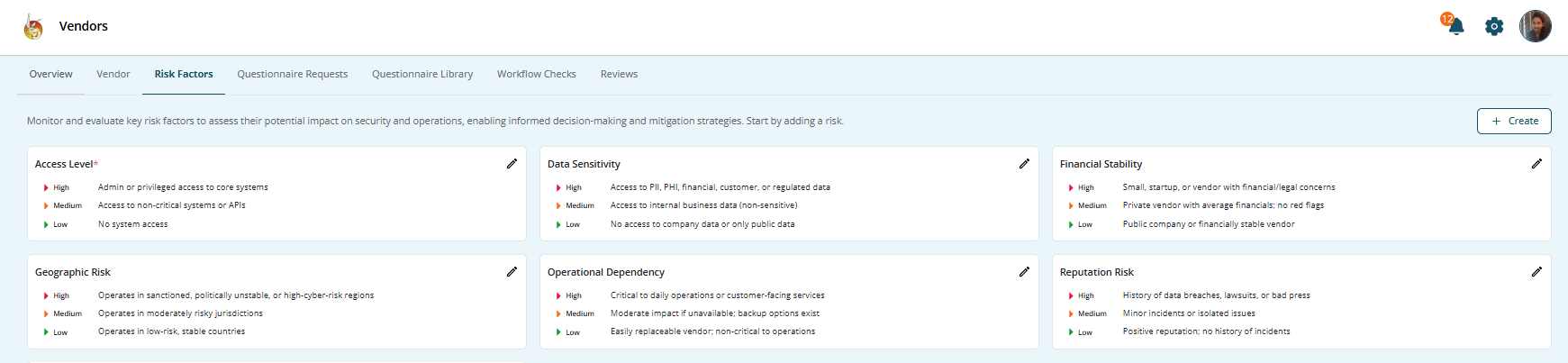
The Risk Factors page typically displays:
- Risk Factor Name
- Description
- Category
- Weight or Severity Level
- Status (Active/Inactive)
- Created By
- Created On
This centralized view allows administrators to manage and refine evaluation criteria over time.
How to Add a Risk Factor
Risk Factors form the backbone of vendor risk evaluation in Kawach. They define how vendor risk is measured, scored, and classified. Properly configured risk factors ensure that vendor classification is consistent, objective, and audit-ready.
Below is a detailed guide to configuring vendor risk criteria effectively.
Step 1: Navigate to Risk Factors
- Open the Vendor Management module.
- Click on Risk Factors from the navigation menu.
This section displays all existing risk factors along with:
- Risk Name
- Factor
- Category
- Severity/Weight
- Status (Active/Inactive)
- Created By
- Created On
From here, you can edit, activate, deactivate, or add new risk criteria.
Step 2: Click “Add Risk”
Click Add Risk to open the configuration form.
This form allows you to define the rule or condition that contributes to vendor risk scoring.
Think of this as creating a risk rule that will later influence vendor classification (Low, Medium, High).
Step 3: Define the Risk Criteria or Question
When creating a risk factor, complete each field carefully to ensure clarity and consistency.
Risk Name
Provide a clear and concise identifier.
Good Example:
Access to Sensitive Data
Other Examples:
- Remote System Access
- Critical Business Dependency
- Cross-Border Data Transfer
- Regulatory Exposure
The name should immediately communicate what is being evaluated.
Description
Explain:
- What the risk measures
- Why it matters
- How it impacts the organization
Example:
“This risk factor evaluates whether the vendor processes or stores confidential, personal, or regulated data that could expose the organization to compliance violations or data breaches.”
A well-written description improves audit transparency and internal understanding.
Risk Category
Categorizing risk factors improves organization and reporting.
Common categories include:
- Information Security
- Data Privacy
- Operational Risk
- Financial Risk
- Regulatory Risk
- Geographic Risk
Using categories helps filter and report risks effectively.
Risk Question or Criteria
This is the most important component.
Define a measurable, objective question that can be clearly answered.
Examples:
- Does the vendor process personal or customer data?
- Does the vendor have administrative access to internal systems?
- Does the vendor operate in regulated industries (e.g., healthcare, finance)?
- Does the vendor maintain ISO 27001 or SOC 2 certification?
- Does the vendor rely on subcontractors for critical services?
Avoid vague wording. Risk questions should produce clear yes/no or defined responses.
Weight or Severity Level
Assign a scoring impact:
- Low – Minimal risk impact
- Medium – Moderate exposure
- High – Significant exposure
- Critical – Severe impact if exploited
Weighted scoring enables automated classification.
For example:
- Access to sensitive data → High
- Remote admin access → Critical
- No public website → Low
The cumulative score from all active risk factors determines overall vendor risk classification.
Status
Set the risk factor to:
- Active – Included in vendor assessments
- Inactive – Temporarily excluded
Only Active risk factors contribute to scoring.
This allows flexibility if criteria need revision without deleting historical records.
Step 4: Save the Risk Factor
Click Save to finalize the configuration.
Once saved:
- The risk factor becomes available in vendor assessments
- It contributes to automated risk scoring
- It influences vendor classification (Low, Medium, High)
- It is logged for traceability and audit purposes
Types of Common Vendor Risk Factors
Below are examples organizations typically configure:
Data Sensitivity Risk
- Personal data
- Financial data
- Health information
- Intellectual property
System Access Risk
- Direct system integration
- VPN access
- API access
- Administrative privileges
Compliance Risk
- Subject to GDPR, HIPAA, PCI-DSS
- Industry-specific regulations
Operational Dependency Risk
- Critical service provider
- Single point of failure
- High business dependency
Geographic Risk
- Vendor operating in high-risk jurisdictions
- Cross-border data transfers
Best Practices for Defining Risk Factors
Keep Criteria Clear and Objective
Avoid vague language. Use measurable conditions.
Avoid Over-Complication
Too many risk factors can make scoring ineffective. Focus on meaningful indicators.
Use Weighted Scoring
Assign higher weight to risks with greater impact.
Review Annually
Update risk criteria as:
- Regulations change
- Business priorities evolve
- New technologies are adopted
Align With Compliance Frameworks
Ensure risk factors support:
- ISO 27001 supplier controls
- SOC 2 third-party oversight
- GDPR processor accountability
- Internal risk management policies
How Risk Factors Improve Governance
By defining risk factors before onboarding vendors, your organization ensures:
- Transparent classification logic
- Repeatable risk assessment methodology
- Audit-ready documentation
- Reduced subjective decision-making
- Stronger third-party governance
Risk Factors act as the rulebook that governs how vendor risk is calculated and managed.
Summary
Defining Risk Factors in Kawach is a critical step in building a structured and defensible vendor risk management program.
They help you:
- Identify vendor risks early
- Apply consistent classification standards
- Enable risk-based decision-making
- Strengthen compliance posture
- Maintain audit-ready documentation
When configured thoughtfully, Risk Factors transform vendor onboarding from a simple registration process into a robust, intelligence-driven risk evaluation system.