Other Articles
Getting Started with Trainings
Support > Training Management
11 February, 2026
The Trainings section in Kawach enables organizations to manage training campaigns, monitor employee participation, and maintain compliance through structured tracking and review mechanisms.
This module ensures that:
- Mandatory trainings are completed on time
- Compliance-related learning is documented
- Progress is measurable
- Audit evidence is readily available
- Continuous learning culture is maintained
Below is a stepwise overview of all key features and workflows within the Trainings section.
1. Training Campaigns
The Training Campaigns module helps you plan, assign, and track training programs across the organization. It ensures employees complete required training—whether mandatory (e.g., Information Security, Data Protection) or optional (e.g., leadership development)—within defined timelines.
Training Campaigns Dashboard
The dashboard provides a structured list of all training campaigns with real-time progress tracking.
Key Fields Displayed
-
Campaign Name
The unique title of the training campaign.
Example: “Information Security Awareness – 2026”
-
Training Program
The specific course or program linked to the campaign.
-
Due Date
The deadline by which participants must complete the training.
-
Departments
Indicates which departments or user groups are assigned.
-
Progress Summary
Displays completion status (e.g., 35/50 completed or 70% progress).
-
Created By
Shows the user who launched the campaign.
-
Status
Indicates whether the campaign is Active, Completed, Overdue, or Closed.
Creating a New Training Campaign
Follow the steps below to launch a new campaign:
Step 1: Click Create New Campaign
Navigate to the Training Campaigns section and click Create New Campaign.
Step 2: Enter Campaign Details
-
Campaign Name (Required Field)
Enter a clear and unique name for the campaign.
-
Training Program
Select the appropriate training from the available list in the Training Library.
-
Due Date
Set a completion deadline.
A defined due date helps ensure timely compliance and structured tracking.
-
Send To
Choose the target audience:
All users
Specific departments
This allows role-based or department-based training allocation.
-
Description
Add additional context such as:
Why the training is important
Whether it is mandatory
Special instructions
Renewal requirements
Step 3: Click Submit
After reviewing the information, click Submit to launch the campaign.
Once submitted:
-
Notifications are sent to assigned users
-
Progress tracking begins immediately
-
Dashboard updates reflect live completion status
-
Activity is logged for audit purposes

Training Campaigns dashboard with progress tracking.
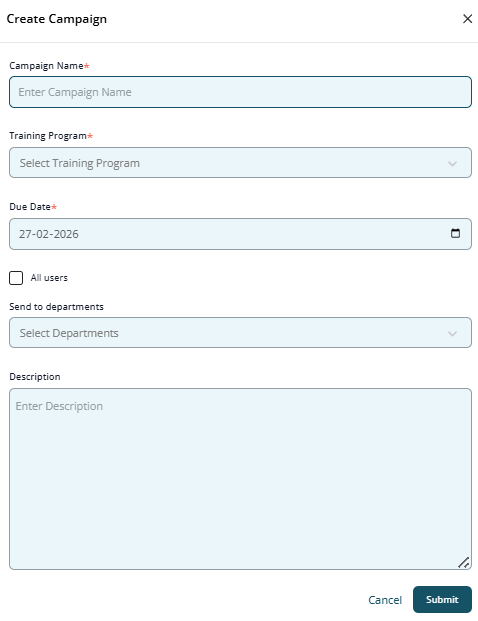
Create New Campaign Form.
2. Training Library
The Training Library acts as a centralized repository of all available training programs within Kawach.
It allows administrators and users to:
- Browse available courses
- Review training content details
- Understand applicability by role or department
- Access training materials directly
- Maintain standardized training modules
This ensures consistency in learning delivery and simplifies campaign creation.
Training Library Overview
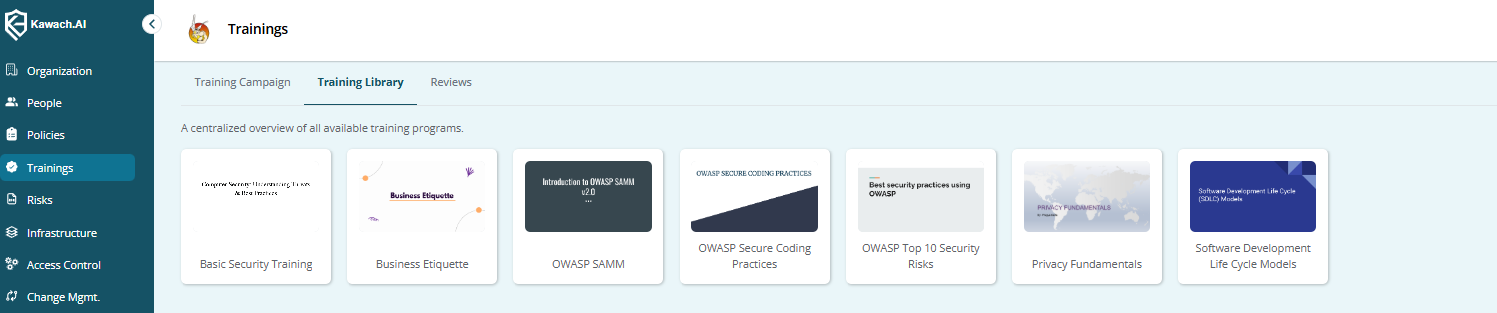
Screenshot of the Training Library overview, showing a list of training programs with categories, duration, and status.
Each training entry may display:
-
Program Name
-
Category (e.g., Security, HR, Compliance)
-
Duration
-
Applicability
-
Status (Active/Archived)
The library ensures that training programs are structured, categorized, and easily accessible.
Compliance & Governance Perspective
The Trainings module supports compliance requirements under:
-
ISO 27001 (Security Awareness & Training)
-
ISO 9001 (Competence & Awareness)
-
SOC 2 (Security Awareness & Monitoring)
It provides documented evidence that:
-
Employees received required training
-
Completion was tracked
-
Management monitored participation
-
Awareness programs are systematically managed
Best Practices
- Set realistic but firm due dates
- Assign training based on roles and risk exposure
- Monitor progress weekly
- Send reminders before deadlines
- Review training effectiveness periodically
- Maintain annual re-certification campaigns for critical topics
Conclusion
The Trainings section in Kawach enables organizations to efficiently manage training campaigns, provide structured access to learning resources, and ensure compliance through systematic tracking and review.
By following best practices and maintaining clear documentation, organizations can ensure:
-
Effective training delivery
-
Measurable participation
-
Strong audit readiness
-
Continuous learning culture
This module transforms training management from a manual follow-up task into a structured, compliance-driven process within Kawach.