Other Articles
Acknowledgement Requests
The Acknowledgement Requests section in Kawach ensures that policies are not only published but also formally acknowledged by employees or specific departments. This feature plays a critical role in demonstrating employee awareness, accountability, and regulatory compliance.
Simply uploading or publishing a policy is not sufficient for compliance. Organizations must be able to prove that relevant personnel have reviewed and accepted the policy. The Acknowledgement Requests module provides structured tracking to ensure this requirement is met.
Purpose of the Acknowledgement Requests Section
This section helps organizations:
- Track who needs to acknowledge specific policies
- Monitor completion status in real time
- Identify overdue acknowledgements
- Maintain documented proof of policy communication
- Demonstrate compliance during audits
It strengthens governance by ensuring that policies are formally accepted by the appropriate stakeholders.
Acknowledgement Requests Dashboard View
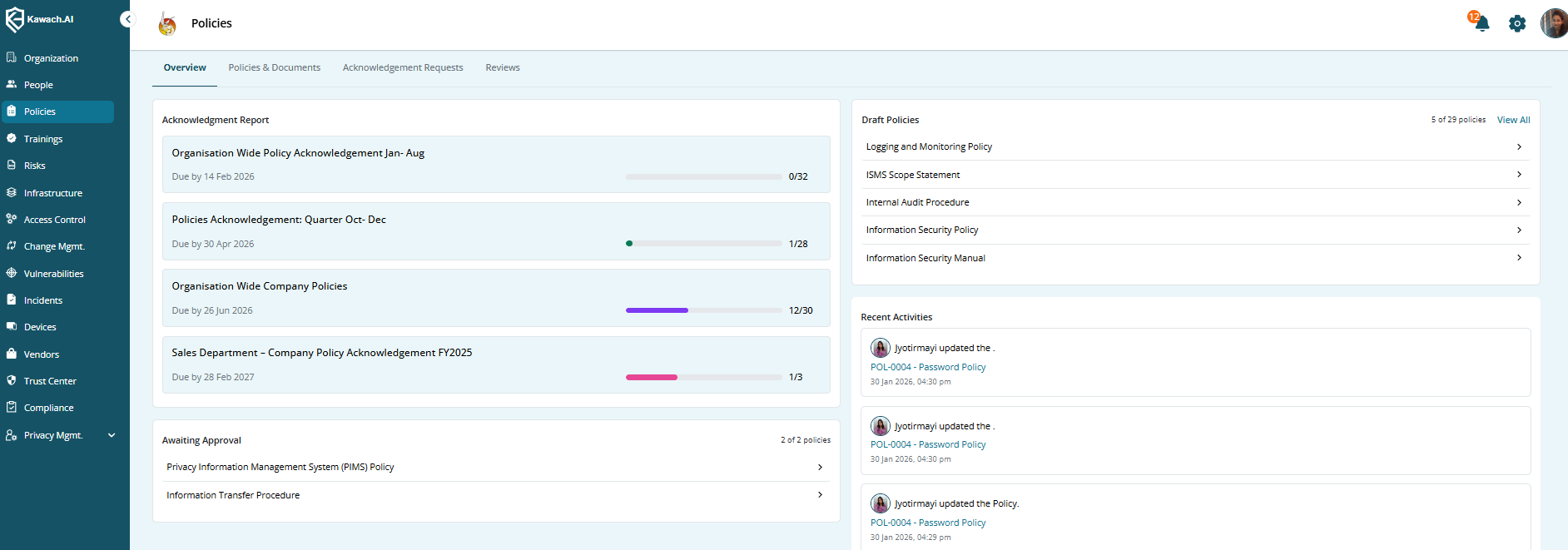
The table provides a centralized view of all acknowledgement campaigns along with their current status and progress.
Displayed Fields
-
Acknowledgement Request Name
The title of the acknowledgement campaign.
This clearly identifies the purpose of the request.
Example:
Information Security Policy Acknowledgement – 2026
Updated HR Manual Acceptance
-
Due Date
The deadline by which users must acknowledge the assigned policy.
This field helps:
Enforce timely compliance
Track overdue acknowledgements
Set accountability expectations
If the due date passes without full completion, the request may show as overdue.
-
Departments
Indicates which departments or user groups are assigned to acknowledge the policy.
This allows targeted communication, such as:
HR-only policies
IT security-related policies
Organization-wide policies
It ensures that only relevant teams are required to respond.
-
Progress Summary
Displays the completion percentage or number of users who have acknowledged the policy.
Examples:
45/50 completed
90% acknowledged
This gives instant visibility into compliance progress and highlights gaps.
-
Created By
Shows the user who initiated the acknowledgement request.
This ensures accountability and helps track responsibility for policy communication.
-
Status
Indicates the current state of the request. Common statuses include:
Active
Completed
Overdue
Closed
This allows compliance teams to quickly identify which requests need attention.
Creating a New Acknowledgement Request
Follow the steps below to issue a new acknowledgement campaign:
Step 1: Click Create Acknowledgement Request
Navigate to the Acknowledgement Requests section and click the Create Acknowledgement Request button.
Step 2: Enter the Required Details
-
Name
Enter a clear and descriptive title for the acknowledgement request.
This should reflect the policy name and, if applicable, the year or version.
-
Due Date
Set a deadline for users to complete their acknowledgement.
Choosing a realistic yet firm deadline ensures timely compliance.
-
Send To
Select the target audience:
Specific departments
Selected users
All users
This ensures relevant distribution and avoids unnecessary notifications.
-
Description
Provide additional instructions or context, such as:
Summary of policy updates
Mandatory reading instructions
Reason for re-acknowledgement
Important compliance notes
Clear communication improves response rates.
Step 3: Click Submit
After verifying all details, click Submit to issue the request.
Once submitted:
-
Notifications are sent to selected users
-
Acknowledgement tracking begins
-
Progress summary updates automatically
-
Activity is recorded in audit logs
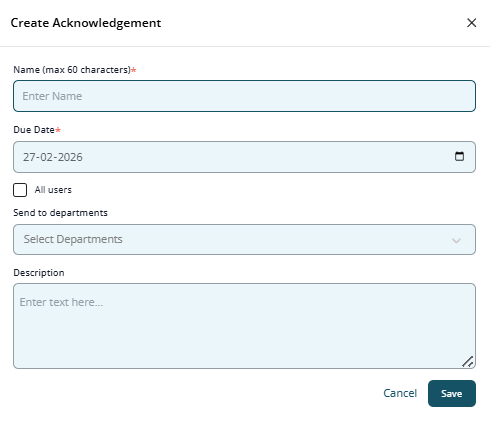
Create Acknowledgement Request form.
Why This Section Is Critical for Compliance
The Acknowledgement Requests section supports compliance requirements under:
- ISO 27001 (Awareness & Communication)
- ISO 9001 (Control of Documented Information)
- SOC 2 (Policy Communication & Accountability)
It provides evidence that:
-
Policies were communicated
-
Employees acknowledged understanding
-
Management monitored completion
Compliance Visibility and Gap Identification
This view provides quick visibility into acknowledgement progress and compliance gaps.
It allows HR and compliance teams to:
- Identify departments with low completion rates
- Send reminders before deadlines
- Take corrective action for overdue acknowledgements
- Maintain structured documentation for audits
In summary, the Acknowledgement Requests section ensures that policies are actively communicated, formally acknowledged, and fully traceable — strengthening governance, accountability, and regulatory compliance within Kawach.