Other Articles
Getting Started with the Organization Setup
Support > Organization Management
11 February, 2026
The Organization Setup in Kawach helps you set up your company’s core information, structure, security roles, and compliance tracking. This section is usually configured during initial setup and reviewed periodically to ensure accuracy and audit readiness.
This guide explains each section of the Organization setup in a simple, step-by-step manner.
How to Access the Organization setup
- Log in to Kawach
- Click on Organization from the main menu
Organization setup on the main navigation bar.
Overview
The Overview section captures the core identity and profile of your organization in Kawach. It defines how your company is represented across the platform and serves as the foundational information layer for governance, compliance, and reporting modules.
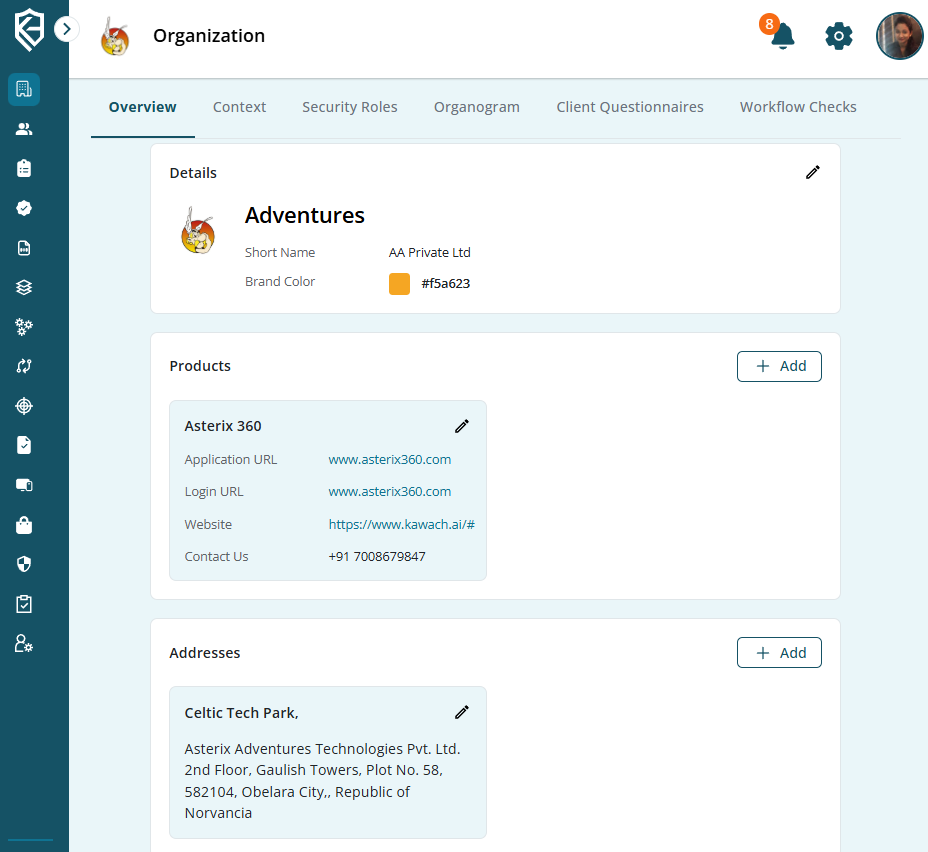
As shown on the screen, the Overview page is divided into three main blocks:
- Details
- Products
- Addresses
Each section can be edited or updated as your organization grows or changes.
1. Details Section
The Details card displays the primary identity of the organization.
Information Covered:
-
Company Name
The official name of the organization.
Example (as shown): Adventures -
Short Name
A commonly used abbreviation or simplified name for internal reference.
Example: AA Private Ltd -
Brand Color
The primary color associated with the organization’s branding inside the platform.
Example: #f5a623
The brand color helps maintain visual consistency across dashboards and reports.
An Edit icon is available in the top-right corner of the Details card, allowing admins to update this information anytime.
2. Products Section
The Products section captures information about the company’s products or services.
In the image, one product is displayed:
Example Product:
Asterix 360
Each product card can include:
-
Application URL
The main application link.
Example: www.asterix360.com
-
Login URL
The login page for users.
Example: www.asterix360.com
-
Website
Official website link related to the product.
Example: https://www.kawach.ai/#
-
Contact Information
Product-related contact number.
Example: +91 7001234847
Each product entry also has an Edit option , allowing updates when URLs, contact details, or product information change.
To Add a New Product:
- Click the + Add button in the Products section.
- Enter relevant product details.
- Save the information.
This helps maintain accurate product documentation and improves visibility during client interactions or audits.
3. Addresses Section
The Addresses section allows you to record your organization’s physical locations.
Example Shown:
Celtic Tech Park
Asterix Adventures Technologies Pvt. Ltd.
2nd Floor, Gaulish Towers, Plot No. 58,
582104, Obelara City, Republic of Norvancia
This section can be used to add:
- Registered Office Address
- Corporate Office
- Branch Offices
- Development Centers
Each address card includes an Edit option for updates.
To Add a New Address:
- Click the + Add button in the Addresses section.
- Enter the full address details.
- Submit to save.
Maintaining updated addresses supports:
- Legal documentation
- Audit records
- Client questionnaires
- Compliance certifications
Why the Overview Section Is Important
The Overview section ensures:
- Accurate organizational representation
- Consistent branding
- Centralized product documentation
- Updated location records
- Audit-ready company profile
Since business details may change over time (rebranding, new products, office relocation), this section can be edited anytime to keep information current.
In summary, the Overview section serves as the identity layer of Kawach, ensuring that your organization’s name, branding, products, and addresses are properly structured and always up to date.
Read Next
Organization Context
Define your mission, vision, values, and objectives to align governance, strategy, and compliance.
Security Roles
Configure access controls and assign roles based on responsibilities to ensure proper governance.
Organogram
View and manage your reporting structure with a real-time visual hierarchy.