Other Articles
- Cloud SQL – Configure Private IP
- Cloud SQL – Monitor CPU Utilization
- Cloud SQL – Enable Deletion Protection
- Cloud SQL – Enable Disk Encryption
- Cloud SQL – Enable Automated Backups
- Cloud SQL – Enable Log Export
- Cloud SQL – Enforce Password Validation
- Cloud SQL – Protect From Internet Access
- Cloud SQL – Enforce Secure Transport
- Compute Engine – Block Project-Wide SSH Keys
- Compute Engine – Disable IP Forwarding
- Compute Engine – Disable Public IP Addresses
- Compute Engine – Disable Serial Port Access
- Compute Engine – Enable Confidential Computing
- Compute Engine – Enable OS Login
- Compute Engine – Enable Shielded VM
- Compute Engine – Restrict Default Service Account
- General – Deny Public Access to KMS Keys
- General – Enforce Duties Separation
- General – Enforce KMS Key Rotation
- General – Restrict Admin Roles on Service Accounts
- Cloud Run – Configure Timeout Settings
- Cloud Storage – Enable Bucket Encryption
- Cloud Storage – Enable Bucket Logging
- Cloud Storage – Enable Bucket Versioning
- Cloud Storage – Restrict Public Access
- IAM Users – Enforce GCP-Managed Keys
- IAM Users – Rotate External User-Managed Service Account Keys
Cloud Storage – Enforce Uniform Bucket-Level Access
This check ensures that uniform bucket-level access is enabled for Google Cloud Storage buckets. Enforcing uniform access simplifies permission management by disabling object-level ACLs and strengthens overall bucket security.
Check Details
- Resource: Storage
- Check: Enforce uniform bucket-level access
- Risk: When uniform bucket-level access is not enabled, object-level ACLs may lead to inconsistent permissions and unintended public or excessive access to stored objects.
Remediation via Google Cloud Console
-
Log in to the Google Cloud Console and navigate to
Buckets.

- Click on the desired bucket name to open the bucket details page.
- Select the Permissions tab.
-
In the section indicating that the bucket uses
fine-grained access control, click Switch to Uniform.
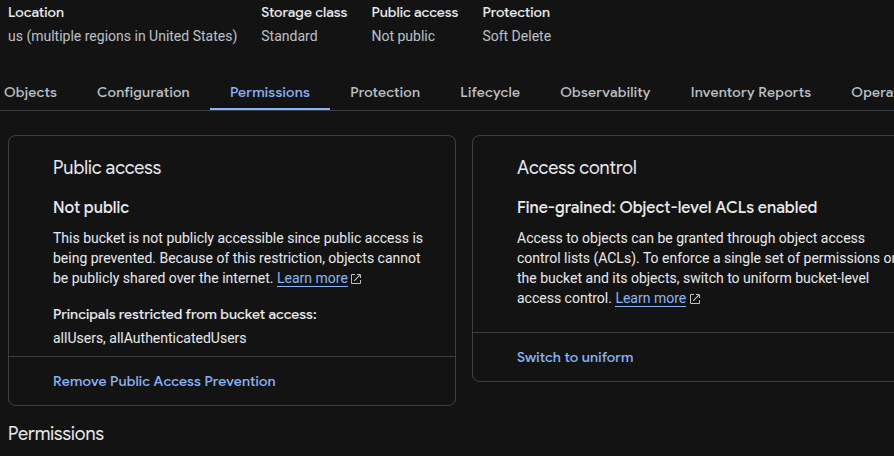
-
In the dialog box, select Uniform access control and click
Save.
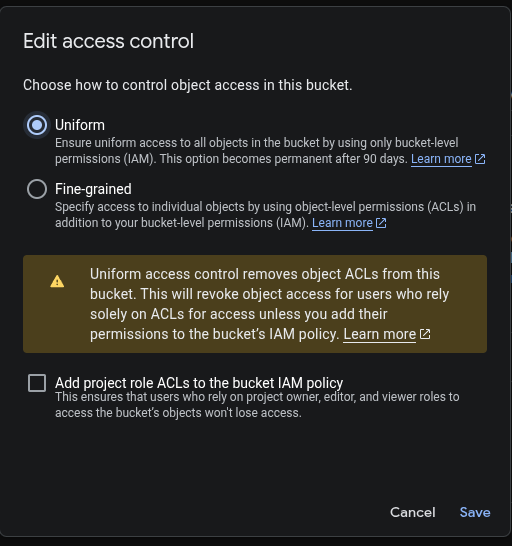
Remediation via Google Cloud CLI
-
Open the Google Cloud Console and launch
Cloud Shell.

-
Enable uniform bucket-level access for the bucket:
gsutil uniformbucketlevelaccess set on gs://<BUCKET_NAME>/
Replace <BUCKET_NAME> with the name of the Cloud Storage bucket.
Default Value
By default, Google Cloud Storage buckets do not have uniform bucket-level access enabled and use fine-grained access control.