Other Articles
- Cloud SQL – Configure Private IP
- Cloud SQL – Monitor CPU Utilization
- Cloud SQL – Enable Deletion Protection
- Cloud SQL – Enable Disk Encryption
- Cloud SQL – Enable Automated Backups
- Cloud SQL – Enable Log Export
- Cloud SQL – Enforce Password Validation
- Cloud SQL – Protect From Internet Access
- Cloud SQL – Enforce Secure Transport
- Compute Engine – Block Project-Wide SSH Keys
- Compute Engine – Disable IP Forwarding
- Compute Engine – Disable Public IP Addresses
- Compute Engine – Disable Serial Port Access
- Compute Engine – Enable Confidential Computing
- Compute Engine – Enable OS Login
- Compute Engine – Enable Shielded VM
- Compute Engine – Restrict Default Service Account
- General – Deny Public Access to KMS Keys
- General – Enforce Duties Separation
- General – Enforce KMS Key Rotation
- Cloud Run – Configure Timeout Settings
- Cloud Storage – Enable Bucket Encryption
- Cloud Storage – Enable Bucket Logging
- Cloud Storage – Enable Bucket Versioning
- Cloud Storage – Enforce Uniform Bucket-Level Access
- Cloud Storage – Restrict Public Access
- IAM Users – Enforce GCP-Managed Keys
- IAM Users – Rotate External User-Managed Service Account Keys
General – Restrict Admin Roles on Service Accounts
This check ensures that user-created service accounts do not have administrative-level IAM roles such as Admin, Editor, or Owner. Restricting these roles enforces least-privilege access and reduces the risk of misuse or privilege escalation.
Check Details
- Resource: Integration
- Check: Restrict Admin Privileges on Service Accounts
- Risk: Service accounts with Admin, Editor, or Owner roles can make unrestricted changes to GCP resources, increasing the impact of credential compromise.
Remediation via Google Cloud Console
-
Go to IAM & Admin → IAM using
Google Cloud Console
.

-
Under the IAM tab, select View by principals.
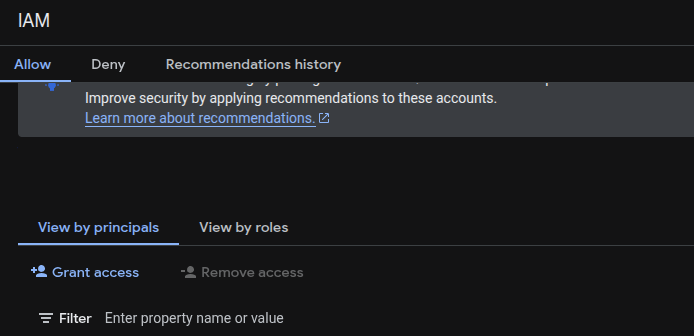
- Filter Principals by type: Service account.
-
Identify user-created service accounts with the principal format:
SERVICE_ACCOUNT_NAME@PROJECT_ID.iam.gserviceaccount.com -
In the Role column, look for roles containing:
*Adminor*adminroles/editorroles/owner
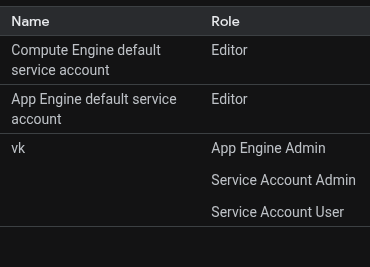
- Click the Edit (pencil icon) for the service account to view all assigned roles.
- Click the Delete (bin) icon to remove the administrative role from the service account.
Remediation via Google Cloud CLI
-
Open the Google Cloud Console and launch
Cloud Shell.

-
Export the project IAM policy to a JSON file:
gcloud projects get-iam-policy PROJECT_ID --format=json > iam.json -
Open
iam.jsonin a text editor and remove any roles that contain:roles/*Adminorroles/*adminroles/editorroles/owner
-
Add a new role to the
bindingsarray to assign a least-privilege role to the service account. -
Example policy update:
{ "bindings": [ { "members": [ "serviceAccount:our-project-123@appspot.gserviceaccount.com" ], "role": "roles/appengine.appViewer" }, { "members": [ "user:email1@gmail.com" ], "role": "roles/owner" }, { "members": [ "serviceAccount:our-project-123@appspot.gserviceaccount.com", "serviceAccount:123456789012-compute@developer.gserviceaccount.com" ], "role": "roles/editor" } ], "etag": "BwUjMhCsNvY=" } -
Apply the updated IAM policy:
gcloud projects set-iam-policy PROJECT_ID iam.json
Default Value
User-managed default service accounts may have the
roles/editor role assigned to support GCP services.
By default, no roles are assigned to user-created service accounts unless
explicitly granted.