Other Articles
- Cloud SQL – Configure Private IP
- Cloud SQL – Monitor CPU Utilization
- Cloud SQL – Enable Deletion Protection
- Cloud SQL – Enable Disk Encryption
- Cloud SQL – Enable Automated Backups
- Cloud SQL – Enable Log Export
- Cloud SQL – Enforce Password Validation
- Cloud SQL – Protect From Internet Access
- Cloud SQL – Enforce Secure Transport
- Compute Engine – Block Project-Wide SSH Keys
- Compute Engine – Disable IP Forwarding
- Compute Engine – Disable Public IP Addresses
- Compute Engine – Disable Serial Port Access
- Compute Engine – Enable Confidential Computing
- Compute Engine – Enable OS Login
- Compute Engine – Enable Shielded VM
- Compute Engine – Restrict Default Service Account
- General – Deny Public Access to KMS Keys
- General – Enforce Duties Separation
- General – Restrict Admin Roles on Service Accounts
- Cloud Run – Configure Timeout Settings
- Cloud Storage – Enable Bucket Encryption
- Cloud Storage – Enable Bucket Logging
- Cloud Storage – Enable Bucket Versioning
- Cloud Storage – Enforce Uniform Bucket-Level Access
- Cloud Storage – Restrict Public Access
- IAM Users – Enforce GCP-Managed Keys
- IAM Users – Rotate External User-Managed Service Account Keys
General – Enforce KMS Key Rotation
Ensure KMS keys are rotated every 90 days to maintain security.
Check Details
- Entity Type: Integration
- Check: Enforce Kms Key Rotation
- Risk: KMS keys that are not rotated regularly increase the risk of key compromise and unauthorized data access.
Remediation via Google Cloud Console
-
Go to Key Management by visiting:
Google Cloud Console
.
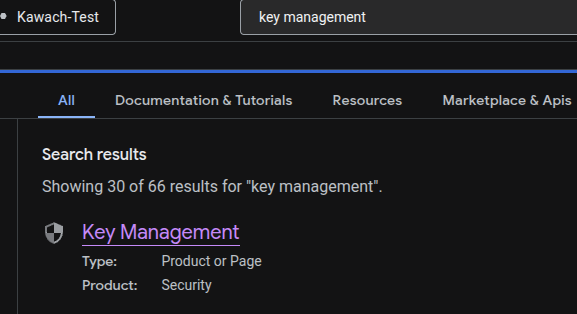
-
Click on the specific key ring.
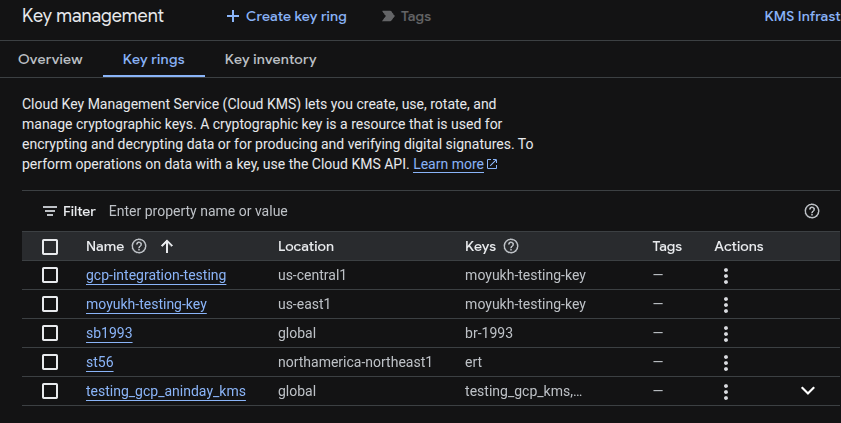
- From the list of keys, choose the specific key and click on the right side pop-up blade (3 dots).
-
Click on Edit rotation period.
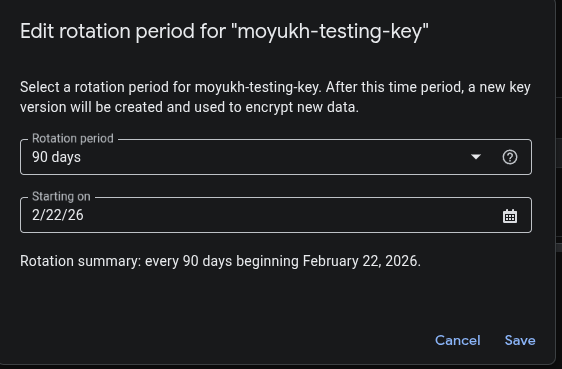
- On the pop-up window, select a new rotation period in days which should be less than 90 and then choose Starting on date (date from which the rotation period begins).
Remediation via Google Cloud CLI
-
Open the Google Cloud Console and launch
Cloud Shell.
-
Update and schedule rotation by ROTATION_PERIOD and
NEXT_ROTATION_TIME for each key:
gcloud kms keys update new \
--keyring=KEY_RING \
--location=LOCATION \
--next-rotation-time=NEXT_ROTATION_TIME \
--rotation-period=ROTATION_PERIOD
Default Value
By default, KMS encryption keys are rotated every 90 days.