Other Articles
- Cloud SQL – Configure Private IP
- Cloud SQL – Monitor CPU Utilization
- Cloud SQL – Enable Deletion Protection
- Cloud SQL – Enable Disk Encryption
- Cloud SQL – Enable Automated Backups
- Cloud SQL – Enable Log Export
- Cloud SQL – Enforce Password Validation
- Cloud SQL – Protect From Internet Access
- Cloud SQL – Enforce Secure Transport
- Compute Engine – Block Project-Wide SSH Keys
- Compute Engine – Disable IP Forwarding
- Compute Engine – Disable Public IP Addresses
- Compute Engine – Disable Serial Port Access
- Compute Engine – Enable Confidential Computing
- Compute Engine – Enable OS Login
- Compute Engine – Enable Shielded VM
- Compute Engine – Restrict Default Service Account
- General – Deny Public Access to KMS Keys
- General – Enforce KMS Key Rotation
- General – Restrict Admin Roles on Service Accounts
- Cloud Run – Configure Timeout Settings
- Cloud Storage – Enable Bucket Encryption
- Cloud Storage – Enable Bucket Logging
- Cloud Storage – Enable Bucket Versioning
- Cloud Storage – Enforce Uniform Bucket-Level Access
- Cloud Storage – Restrict Public Access
- IAM Users – Enforce GCP-Managed Keys
- IAM Users – Rotate External User-Managed Service Account Keys
General – Enforce Duties Separation
Ensure separation of duties is enforced when assigning service account roles to users to reduce risk of unauthorized actions and maintain accountability.
Check Details
- Entity Type: Integration
- Check: Enforce Duties Separation
- Risk: Assigning both Service Account Admin and Service Account User roles to the same member can lead to unauthorized actions and reduced accountability.
Remediation via Google Cloud Console
-
Go to IAM & Admin → IAM using
Google Cloud Console
.

-
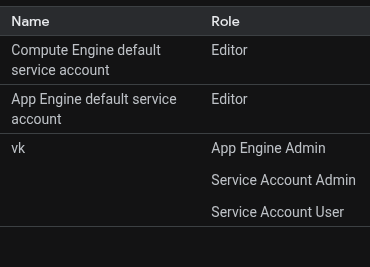
Identify any member that has both
Service Account Admin and
Service Account User roles granted or assigned.
-
Click the Edit principal button and click the Delete (bin) icon to remove either role
from the member.
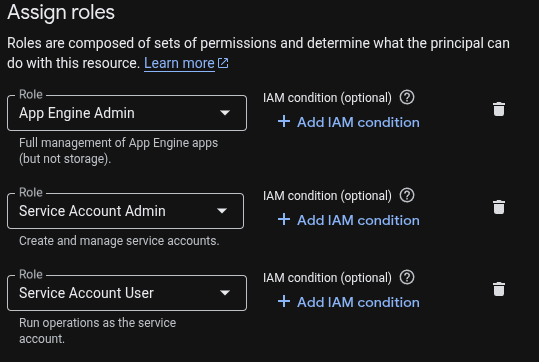
- Removal of a role should be done based on the business requirements.