Other Articles
- Cloud SQL – Configure Private IP
- Cloud SQL – Monitor CPU Utilization
- Cloud SQL – Enable Deletion Protection
- Cloud SQL – Enable Disk Encryption
- Cloud SQL – Enable Automated Backups
- Cloud SQL – Enable Log Export
- Cloud SQL – Enforce Password Validation
- Cloud SQL – Protect From Internet Access
- Cloud SQL – Enforce Secure Transport
- Compute Engine – Block Project-Wide SSH Keys
- Compute Engine – Disable IP Forwarding
- Compute Engine – Disable Serial Port Access
- Compute Engine – Enable Confidential Computing
- Compute Engine – Enable OS Login
- Compute Engine – Enable Shielded VM
- Compute Engine – Restrict Default Service Account
- General – Deny Public Access to KMS Keys
- General – Enforce Duties Separation
- General – Enforce KMS Key Rotation
- General – Restrict Admin Roles on Service Accounts
- Cloud Run – Configure Timeout Settings
- Cloud Storage – Enable Bucket Encryption
- Cloud Storage – Enable Bucket Logging
- Cloud Storage – Enable Bucket Versioning
- Cloud Storage – Enforce Uniform Bucket-Level Access
- Cloud Storage – Restrict Public Access
- IAM Users – Enforce GCP-Managed Keys
- IAM Users – Rotate External User-Managed Service Account Keys
Compute Engine – Disable Public IP Addresses
This check ensures that Compute Engine VM instances do not have public (external) IP addresses assigned to reduce exposure to the internet.
Check Details
- Resource: Compute Engine VM Instance
- Check: Disallow public (external) IP addresses
- Risk: VM instances with public IPs are directly exposed to the internet, increasing the risk of brute-force attacks, exploitation, and unauthorized access.
Remediation via Google Cloud Console
-
Log in to the Google Cloud Console and navigate to the
VM instances page:
https://console.cloud.google.com/compute/instances
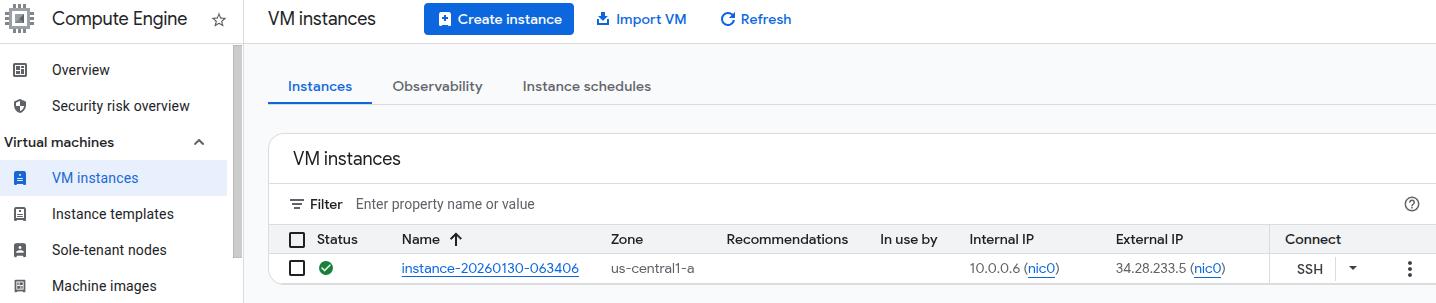
- Click on the affected VM instance name to open the Instance details page.
-
Click Edit at the top of the page.

-
Under Network interfaces, ensure that
External IP is set to None for each interface.
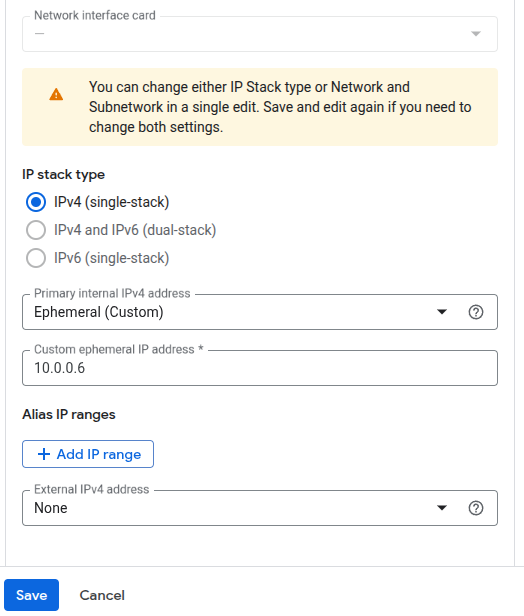
- Click Done, then click Save to apply the changes.
Remediation via Google Cloud CLI
-
Open the Google Cloud Console and click the
Cloud Shell icon (
>_) in the top-right corner.
-
Describe the instance to identify the external IP configuration:
gcloud compute instances describe <INSTANCE_NAME> --zone=<ZONE> -
Identify the access configuration that contains the external IP address.
It appears similar to the following:
networkInterfaces: - accessConfigs: - kind: compute#accessConfig name: External NAT natIP: 130.211.181.55 type: ONE_TO_ONE_NAT -
Delete the access configuration to remove the public IP address:
gcloud compute instances delete-access-config <INSTANCE_NAME> \
 --zone=<ZONE> \
 --access-config-name <ACCESS_CONFIG_NAME>
Replace <INSTANCE_NAME>, <ZONE>, and
<ACCESS_CONFIG_NAME> with your actual instance details.
Default Value
By default, Google Compute Engine VM instances are created with a public (external) IP address unless explicitly disabled during instance creation or configuration.