Other Articles
- Cloud SQL – Configure Private IP
- Cloud SQL – Monitor CPU Utilization
- Cloud SQL – Enable Deletion Protection
- Cloud SQL – Enable Disk Encryption
- Cloud SQL – Enable Automated Backups
- Cloud SQL – Enable Log Export
- Cloud SQL – Enforce Password Validation
- Cloud SQL – Protect From Internet Access
- Cloud SQL – Enforce Secure Transport
- Compute Engine – Disable IP Forwarding
- Compute Engine – Disable Public IP Addresses
- Compute Engine – Disable Serial Port Access
- Compute Engine – Enable Confidential Computing
- Compute Engine – Enable OS Login
- Compute Engine – Enable Shielded VM
- Compute Engine – Restrict Default Service Account
- General – Deny Public Access to KMS Keys
- General – Enforce Duties Separation
- General – Enforce KMS Key Rotation
- General – Restrict Admin Roles on Service Accounts
- Cloud Run – Configure Timeout Settings
- Cloud Storage – Enable Bucket Encryption
- Cloud Storage – Enable Bucket Logging
- Cloud Storage – Enable Bucket Versioning
- Cloud Storage – Enforce Uniform Bucket-Level Access
- Cloud Storage – Restrict Public Access
- IAM Users – Enforce GCP-Managed Keys
- IAM Users – Rotate External User-Managed Service Account Keys
Compute Engine – Block Project-Wide SSH Keys
This check ensures that project-wide SSH keys are blocked for Google Cloud Compute Engine VM instances. Blocking project-wide SSH keys enforces the use of instance-specific SSH keys, reducing the risk of unauthorized access.
Check Details
- Resource: Compute Engine
- Check: Block project-wide SSH keys
- Risk: Project-wide SSH keys allow users to access multiple VM instances, increasing the attack surface and risk of unauthorized access.
Remediation via Google Cloud Console
-
Log in to the Google Cloud Console and navigate to the
VM instances page.
https://console.cloud.google.com/compute/instances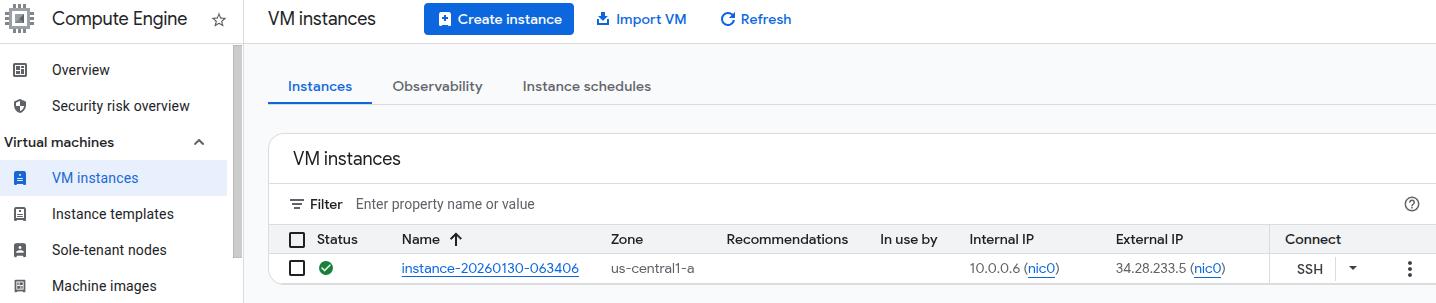
- Click on the name of the impacted VM instance.
-
Click Edit in the top toolbar.

- Scroll to the SSH Keys section.
-
Select the checkbox Block project-wide SSH keys.
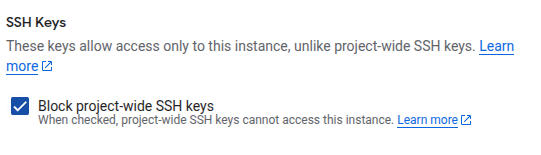
- Click Save at the bottom of the page.
- Repeat these steps for every impacted VM instance.
Remediation via Google Cloud CLI
-
Open the Google Cloud Console and click the
Cloud Shell icon (
>_) in the top-right corner.
-
Block project-wide SSH keys for the VM instance by running:
gcloud compute instances add-metadata <INSTANCE_NAME> \
--metadata block-project-ssh-keys=TRUE
Replace <INSTANCE_NAME> with the name of the Compute Engine
VM instance.
Default Value
By default, Block project-wide SSH keys is not enabled for Compute Engine VM instances.