Other Articles
- Cloud SQL – Configure Private IP
- Cloud SQL – Monitor CPU Utilization
- Cloud SQL – Enable Disk Encryption
- Cloud SQL – Enable Automated Backups
- Cloud SQL – Enable Log Export
- Cloud SQL – Enforce Password Validation
- Cloud SQL – Protect From Internet Access
- Cloud SQL – Enforce Secure Transport
- Compute Engine – Block Project-Wide SSH Keys
- Compute Engine – Disable IP Forwarding
- Compute Engine – Disable Public IP Addresses
- Compute Engine – Disable Serial Port Access
- Compute Engine – Enable Confidential Computing
- Compute Engine – Enable OS Login
- Compute Engine – Enable Shielded VM
- Compute Engine – Restrict Default Service Account
- General – Deny Public Access to KMS Keys
- General – Enforce Duties Separation
- General – Enforce KMS Key Rotation
- General – Restrict Admin Roles on Service Accounts
- Cloud Run – Configure Timeout Settings
- Cloud Storage – Enable Bucket Encryption
- Cloud Storage – Enable Bucket Logging
- Cloud Storage – Enable Bucket Versioning
- Cloud Storage – Enforce Uniform Bucket-Level Access
- Cloud Storage – Restrict Public Access
- IAM Users – Enforce GCP-Managed Keys
- IAM Users – Rotate External User-Managed Service Account Keys
Cloud SQL – Enable Deletion Protection
This check ensures that deletion protection is enabled for Cloud SQL instances. Deletion protection helps prevent accidental or unauthorized deletion of critical database resources.
Check Details
- Resource: Cloud SQL
- Check: Enable deletion protection
- Risk: If deletion protection is not enabled, Cloud SQL instances may be accidentally or maliciously deleted, resulting in permanent data loss and service disruption.
Remediation via Google Cloud Console
-
Log in to the Google Cloud Console and navigate to
Cloud SQL.
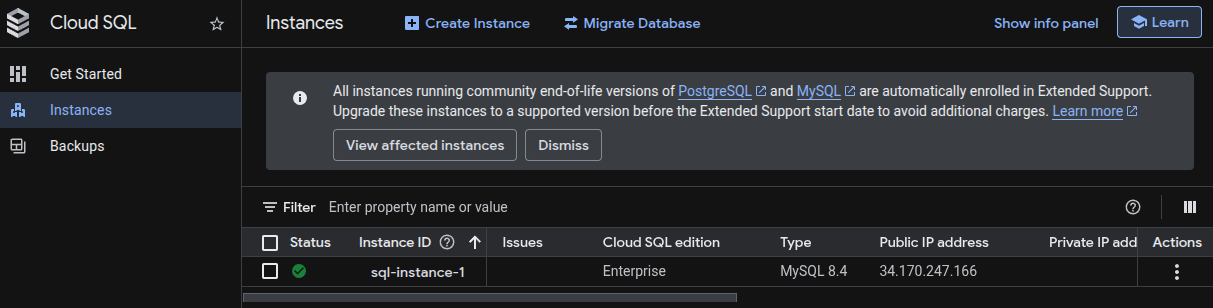
- Click on the affected Cloud SQL instance.
-
Click Edit to modify the instance configuration.

- Scroll to the Data protection or Instance settings section.
-
Enable Deletion protection.
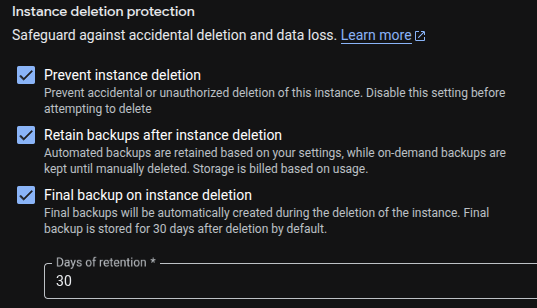
- Click Save to apply the changes.
Remediation via Google Cloud CLI
-
Open the Google Cloud Console and launch
Cloud Shell.

-
Enable deletion protection for a Cloud SQL instance:
gcloud sql instances patch <INSTANCE_NAME> \
--deletion-protection
Replace <INSTANCE_NAME> with the name of the Cloud SQL instance
you want to protect from accidental deletion.
Default Value
By default, deletion protection is disabled for Cloud SQL instances. Instances can be deleted without additional safeguards unless deletion protection is explicitly enabled.