Other Articles
Enable Root Domain HSTS
This check ensures that the root domain returns an HTTP Strict Transport Security (HSTS) header with the includeSubDomains directive. Enabling HSTS enforces HTTPS communication across the root domain and all subdomains.
Check Details
- Resource: Domain
- Check: Enable Root Domain HSTS
- Risk: If HSTS is not enabled or is misconfigured, users may access the website over insecure HTTP connections, increasing the risk of man-in-the-middle attacks.
Prerequisites
HTTPS must already be enabled and enforced for the root domain and all subdomains before enabling HSTS.
Remediation
- Open the HTTPS server block configuration for your domain in Nginx.
-
Add the following HSTS header inside the HTTPS server block:
add_header Strict-Transport-Security "max-age=31536000; includeSubDomains" always;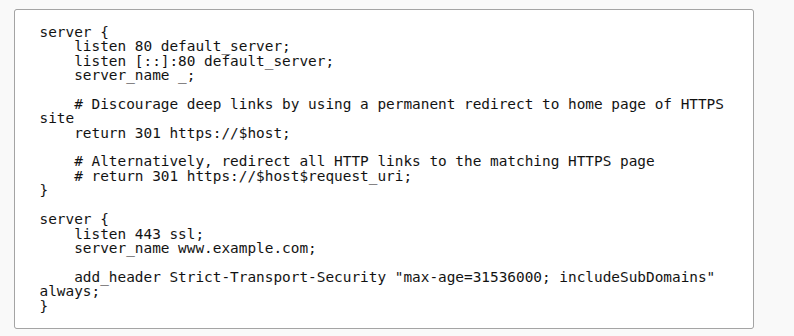
-
Test the Nginx configuration:
sudo nginx -t -
Reload Nginx to apply the changes:
sudo systemctl reload nginx
Verification
Verify that the HSTS header is present by running the following command:
curl -I https://example.com
Expected output:
Strict-Transport-Security: max-age=31536000; includeSubDomains
Replace example.com with your root domain name.